



 Front-end
 Back-end
 Full Stack Developer
 Mobile
 Other
Other


 Company
 Contact Us
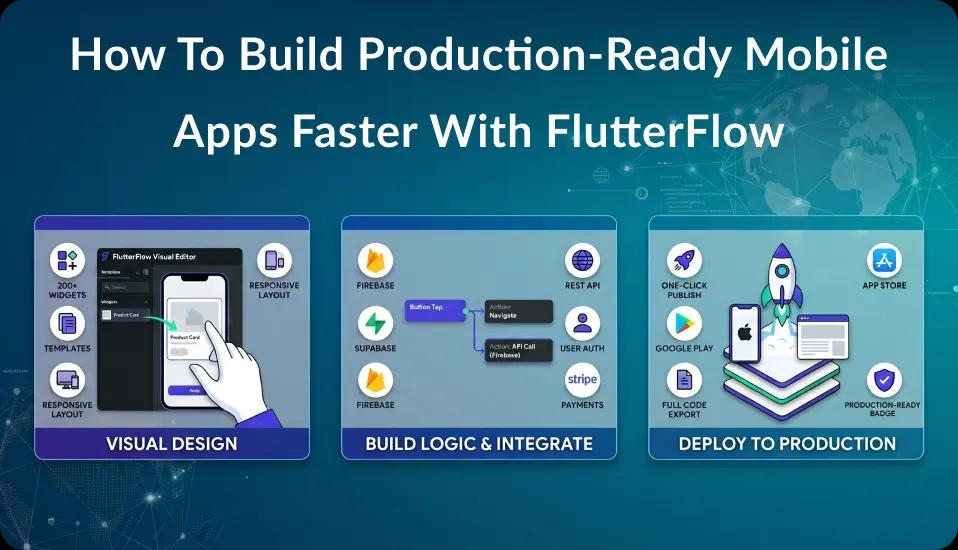
The mobile app market is projected to reach $626.39 billion by 2030, growing at a 14.3% CAGR (Grand View Research). Every business wants a piece of that growth. Yet traditional app development still takes 4-12 months and costs $40,000 to $500,000+ (Clutch App Development Cost Guide). That kind of timeline kills momentum and burns cash fast.
FlutterFlow changes the math entirely. It's a visual development platform built on Google's Flutter framework that lets teams build production-ready apps in weeks, not months. With over 2 million users (FlutterFlow) and backing from Google Ventures at a ~$170 million valuation (TechCrunch), this platform isn't a toy for hobbyists. It's a serious tool for serious apps.
This guide walks you through the complete process of building apps that are genuinely ready for the App Store and real users. If you're new to the platform, start with our complete guide to what FlutterFlow is and how it works first. You can also explore our full range of mobile app development services for custom project support.
Key Takeaways
- FlutterFlow cuts development time by 50-70% compared to traditional methods (Gartner)
- Production-grade apps need more than prototyping - they require architecture planning, security hardening, and performance tuning
- The platform produces apps costing $5,000-$60,000 vs. $40,000-$500,000+ for traditional development
- Full code export means zero vendor lock-in, which is a critical edge over other visual and low-code platforms
- Real companies have hit $100K+ in revenue from apps built on this platform
Why Does "Production-Ready" Matter in Visual App Development?
Visual development platforms now cut development time by 50-70% (Gartner via ToolJet), and the broader low-code market is set to reach $44.5 billion by 2026 (Gartner via InfoWorld). But here's the thing - speed without stability is a recipe for failure. Most apps built with visual tools that work in a demo break down under real-world pressure.
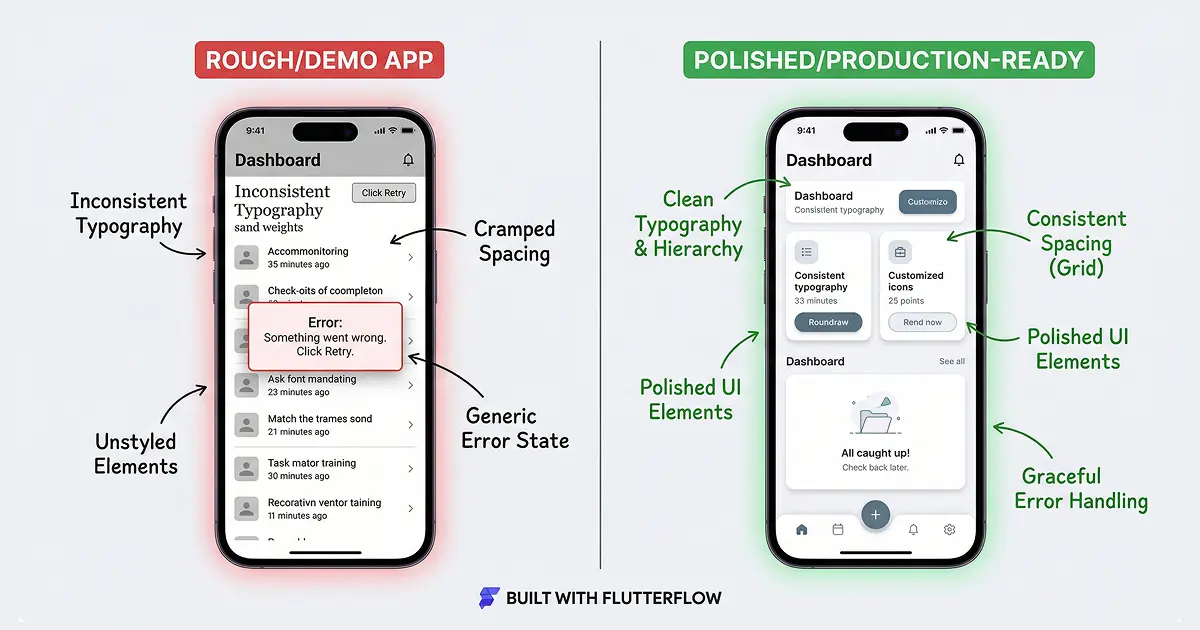
So what does "production-ready" actually mean? It means your app delivers a polished UI, handles edge cases gracefully, and passes App Store review on the first try. The mobile app is the front-end layer - scaling is your backend's job (Firebase, Supabase, or your own servers). Your job on the app side is to make it fast, secure, and reliable.
Here's what makes an app truly launch-ready:
- Reliability: The app handles edge cases without crashing
- Security: Login systems, data encryption, and API protection are locked down
- Performance: Pages load in under 2 seconds on average devices
- Maintainability: Another developer can pick up the code and keep building
- Compliance: Privacy rules, data handling, and app store guidelines are all met
- Polished UI/UX: Consistent design, smooth animations, and intuitive navigation
Why Do Most Visually-Built Apps Fail at Production?
The problem isn't the platform itself. Instead, it's the approach. Teams treat visual builders like magic wands and skip the same basics that make traditional apps solid. They don't plan database schemas. They skip security checks. They ignore error handling.
By 2026, 75% of new apps will be built using low-code or visual development tools, (Gartner via Kissflow). That surge means more apps will hit production than ever before - and more will fail, unless teams follow strong engineering practices within their visual development workflows.
Citation Capsule: Visual development platforms cut development time by 50-70% according to Gartner, but reaching production readiness requires careful architecture planning, security hardening, and performance tuning that many teams skip when building visually.
What Is FlutterFlow? A Quick Primer
FlutterFlow is a visual app builder with over 2 million users worldwide (FlutterFlow), built on top of Google's Flutter framework. Two former Google engineers created it, and it's backed by Y Combinator plus a $25.5 million Series A from Google Ventures (TechCrunch). Think of it as a drag-and-drop interface that writes real Flutter code behind the scenes.
Having worked on 100+ projects using this platform, we've seen firsthand how it bridges the gap between quick prototyping and building apps people actually rely on every day.
For a deeper look at the platform's features, check out our complete guide to FlutterFlow.
How Is It Different From No-Code and Low-Code Tools?
Most no-code and low-code platforms trap you in their system. FlutterFlow doesn't - because it's not really in that category. It's a visual development platform that generates real, exportable Flutter code. Here's what sets it apart:
- Full code export: Download clean, readable Flutter/Dart code whenever you want. No lock-in.
- Built on Flutter: Your app compiles to native code for iOS and Android, plus web and desktop.
- Visual + code hybrid: Use the drag-and-drop builder for speed, then drop into custom Dart code for tricky logic.
- Firebase and Supabase support: Deep, first-class backend connections - not just a basic REST wrapper.
- Real-time teamwork: Multiple developers can work on the same project at the same time.
Flutter itself now has 1 million+ active monthly developers worldwide (Google I/O) and roughly 175,000 GitHub stars (Dev Newsletter - State of Flutter). Because the platform is built on Flutter, your app taps into that mature ecosystem, its speed optimizations, and its huge community.
Wondering how it stacks up against other tools? Read our Webflow vs. Bubble vs. FlutterFlow comparison for a head-to-head breakdown.
Citation Capsule: FlutterFlow, backed by a $25.5 million Series A from Google Ventures at a ~$170 million valuation, is a visual development platform that generates real Flutter code - not a traditional low-code tool. Full code export removes vendor lock-in while keeping visual development speed (TechCrunch).
How Does FlutterFlow Compare to Traditional Flutter Development?
46% of developers already pick Flutter as their go-to cross-platform framework (Statista). FlutterFlow doesn't replace Flutter development - it speeds it up. That said, the two approaches serve different needs, and choosing the right one depends on your project's complexity, timeline, and budget.
Speed and Cost Comparison Table
| Factor | FlutterFlow | Traditional Flutter |
|---|---|---|
| MVP Timeline | 2-6 weeks | 3-6 months |
| Cost Range | $5,000 - $60,000 | $40,000 - $500,000+ |
| Skill Level Needed | Mid-level + platform know-how | Senior Flutter/Dart engineers |
| UI Prototyping | Hours (visual builder) | Days to weeks (coded) |
| Custom Animations | Limited (basic built-in) | Unlimited (full Dart access) |
| Code Ownership | Full (exportable) | Full (built from scratch) |
| Third-Party Packages | Growing support | Entire Flutter ecosystem |
| Maintenance | Visual editor + code | Code only |
Sources: App costs from Clutch. Timeline data from Newly.app.
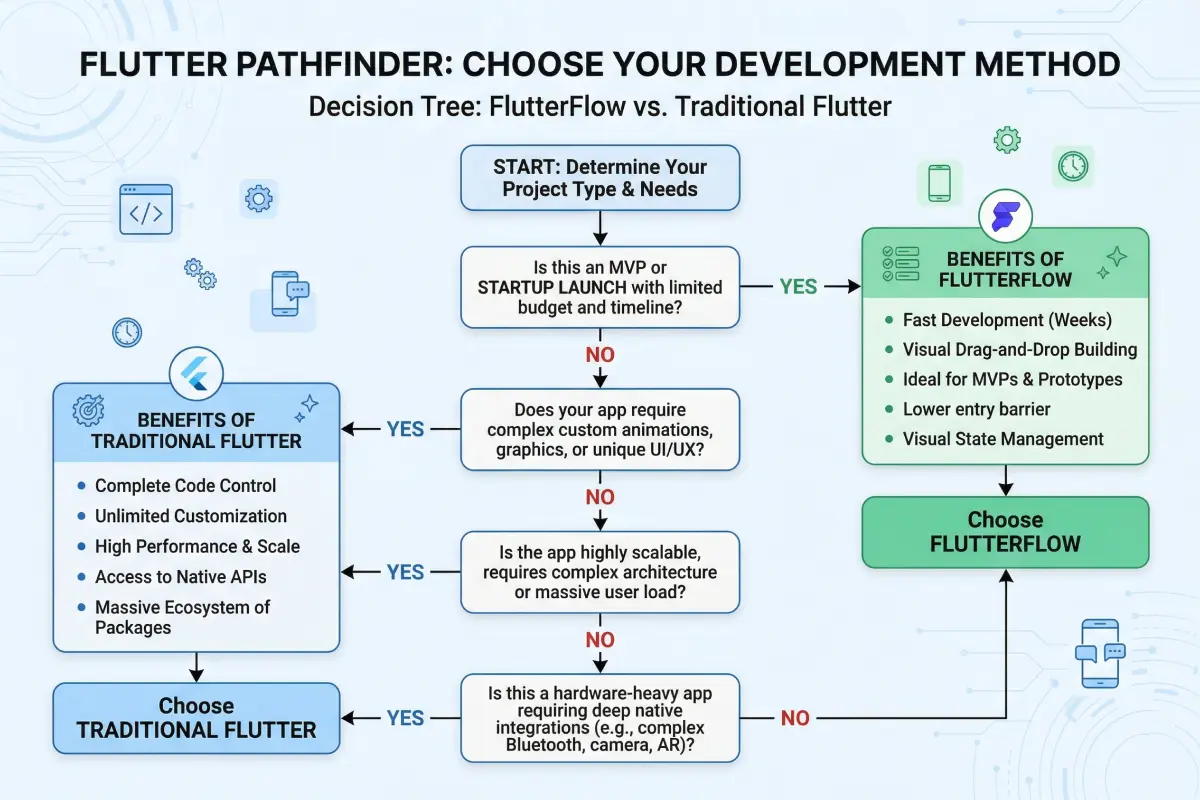
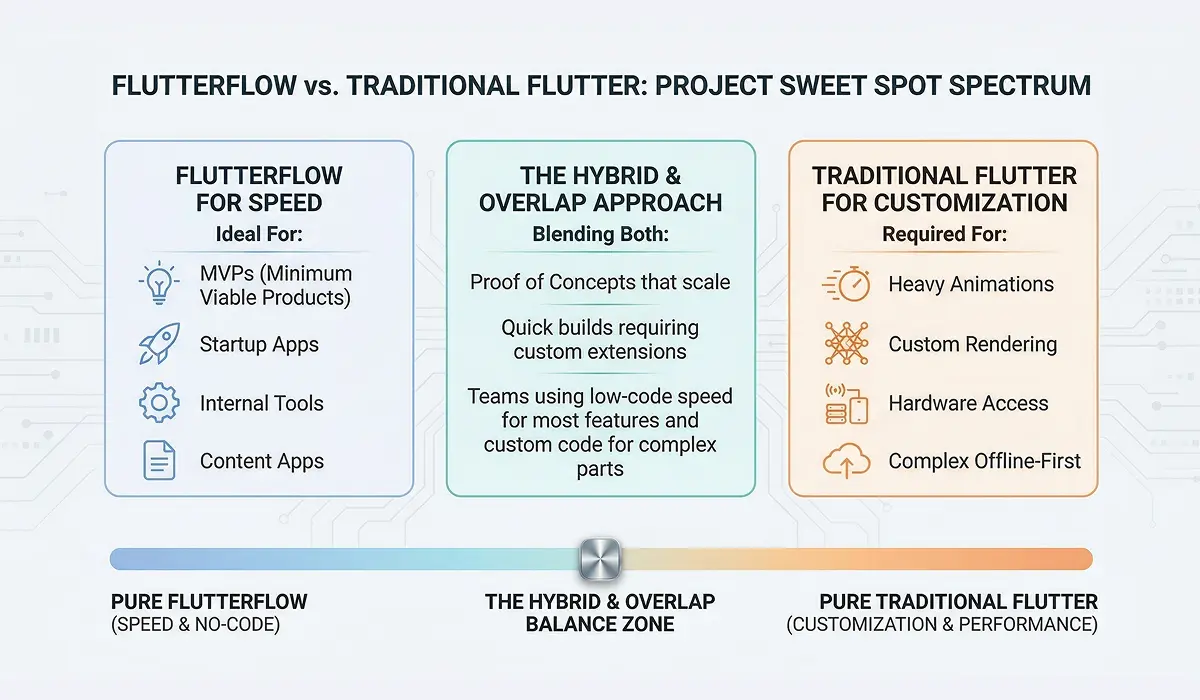
When Should You Choose FlutterFlow?
The platform is the right call when you need to move fast without cutting corners. Specifically, it works best for:
- MVPs and startup launches where getting to market first matters most
- Business apps with standard features like forms, dashboards, and user management
- Content-driven apps such as marketplaces, directories, or social platforms
- Internal tools where 80% of what you need follows common patterns
Want a deeper cost breakdown for your MVP idea? Read our guide on hiring a FlutterFlow developer for MVP development.
When Should You Choose Traditional Flutter?
On the other hand, go with custom Flutter development when your project calls for:
- Complex custom animations or 3D rendering
- Heavy video or audio processing
- Custom low-level device connections (Bluetooth protocols, sensors)
- Extreme UI performance demands (custom render pipelines, complex animations)
Citation Capsule: Cross-platform development with Flutter costs 30-50% less than building separate native iOS and Android apps (CMARIX). On top of that, FlutterFlow pushes costs even lower through visual development that cuts timelines by 50-70%.
Step-by-Step: Building Production-Ready Apps with FlutterFlow
Visual development platforms can compress launch timelines from 4-12 months down to 1-4 weeks (Newly.app). But hitting that speed without cutting corners takes a clear, structured process. Here's the exact workflow we follow for every production build.
Step 1: Architecture Planning and Project Setup
Skip this step and you'll pay for it by week three. Architecture planning means mapping out your data model, user roles, screen flow, and third-party services before touching the builder.
What to define before you start building:
- Data schema: Every collection, document structure, and relationship on paper first
- User roles and permissions: Admin, regular user, guest - whatever your app needs
- Navigation flow: Screen-by-screen user journey, including error states
- API inventory: Every outside service you'll connect to, with docs ready
- State management plan: What lives locally vs. globally vs. on the server
Here's something we've learned from experience: teams who spend 3-5 days on architecture planning before building actually finish faster than teams who jump straight in. Why? Because the upfront work removes the costly rework cycles that blow up timelines later.
To get started, create a new project in the platform, pick your target platforms (iOS, Android, Web), and set up your theme: colors, fonts, spacing. These become your design system. Changing them later means touching every single screen.
Step 2: UI/UX Design with Production Standards
A production interface isn't just "looks good on my phone." It means your design works across screen sizes, handles edge cases gracefully, and meets basic accessibility standards.
Production UI checklist:
- Use responsive layouts with breakpoints for phone, tablet, and web
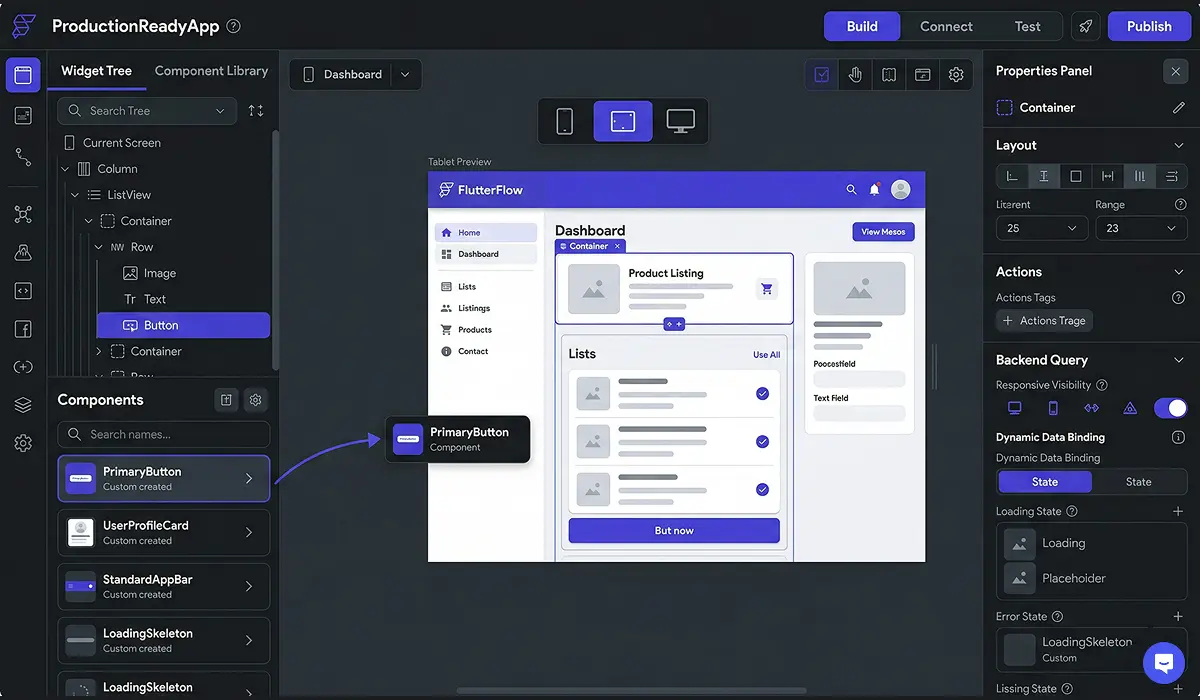
- Build reusable components for headers, cards, buttons, and form fields
- Design empty states for lists and feeds (what does a user see with zero data?)
- Create loading states with skeleton screens instead of plain spinners
- Add error states for every widget that depends on data
- Test with very long text strings to catch overflow problems
The platform's component system lets you build once and reuse everywhere. A solid component library can cut UI work in half for multi-screen apps.
Step 3: Backend Configuration - Firebase vs. Supabase
Your backend choice shapes everything: how users log in, how data gets queried, whether you get real-time features, and what you pay as your user base grows. The platform offers deep support for both Firebase and Supabase.
| Feature | Firebase | Supabase |
|---|---|---|
| Database Type | NoSQL (Firestore) | PostgreSQL (relational) |
| Real-Time | Built-in | Built-in |
| Authentication | Google-managed | Open-source |
| Pricing Model | Pay-per-read/write | Pay-per-compute |
| Best For | Quick setup, simple data | Complex queries, relational data |
| Lock-in Risk | Higher (Google system) | Lower (open-source) |
Pick Firebase when your data is simple and nested, you want the fastest setup, and your usage patterns are predictable.
Pick Supabase when you need relational data, complex SQL queries, or an open-source backend you can host yourself.
For apps that need outside API connections, like banking integrations, our tutorial on running Plaid with the platform walks through the full process.
Step 4: Authentication and Security Hardening
Security isn't optional for production apps. A single data breach doesn't just lose users - it can end your business.
Authentication setup:
- Enable email/password login as your baseline
- Add social login (Google, Apple) to reduce sign-up friction
- Turn on email verification before granting full access
- Set up password reset flows with proper token expiration
- Configure session management with auto-timeout
Going beyond basic authentication:
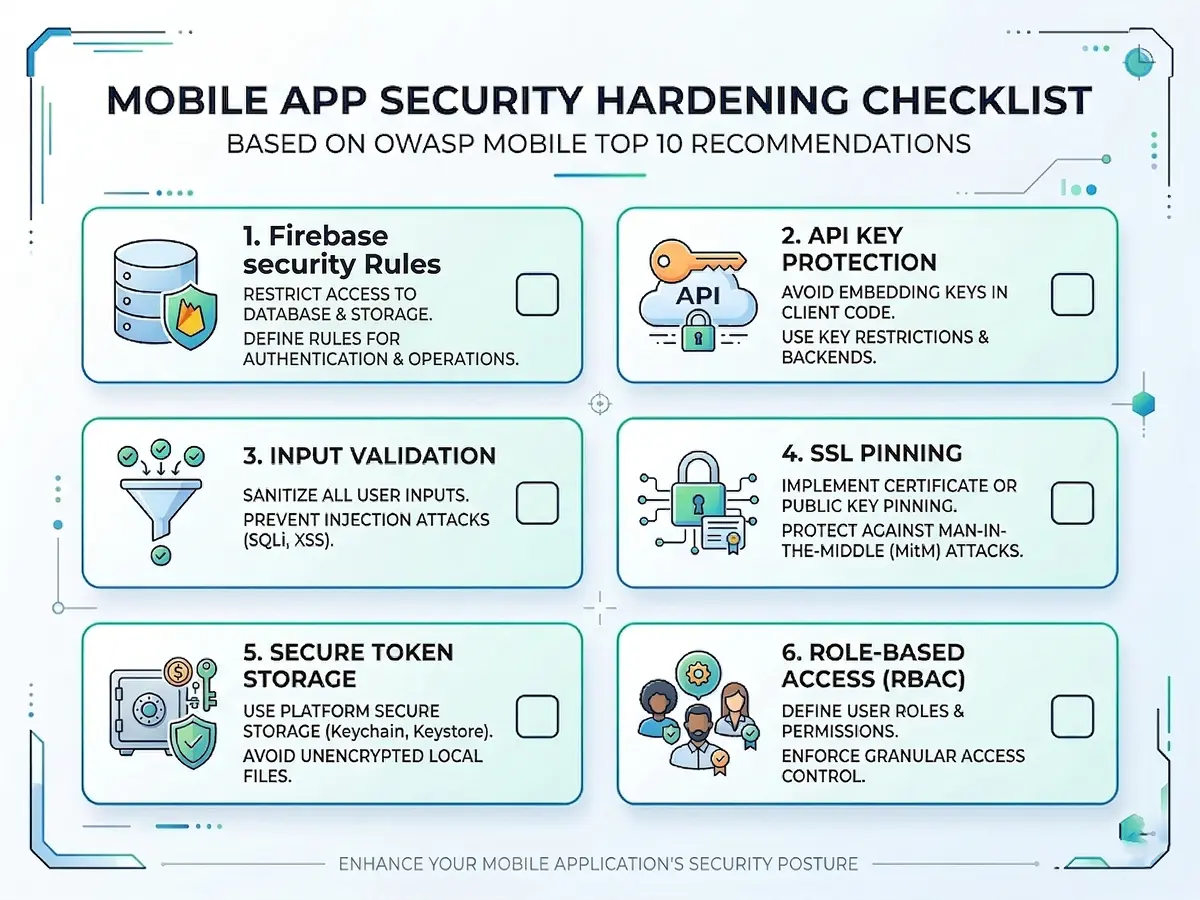
- Database security rules (Firestore Rules or Supabase Row Level Security): Never trust the client. Write rules that check every read and write at the database level.
- API key protection: Keep sensitive keys in Cloud Functions or backend services. Never put them in the client app.
- Input validation: Clean all user inputs on both the client and server side.
- Rate limiting: Guard your APIs from abuse using Cloud Functions middleware.
- SSL/TLS: Make sure all API calls use HTTPS. The platform does this by default, but double-check any custom endpoints.
Step 5: API Integrations and Custom Code
Most production apps connect to outside services: payment processors, analytics tools, messaging APIs, CRMs. The platform handles this through its API Manager and Custom Code features.
Using the API Manager:
- Define API calls with headers, parameters, and request bodies
- Parse JSON responses and map them to app variables
- Group related APIs under shared base URLs and auth headers
- Build error handling with conditional logic, not just hope
When to write Custom Dart Code:
The platform lets you add custom functions, actions, and widgets in Dart. This comes in handy for:
- Complex business logic that visual builders can't express well
- Third-party SDK integrations without REST APIs
- Custom data transforms or encryption routines
- Device-specific features (camera, biometrics, local storage)
Does that mean you need a Dart expert on the team? Not always. But having access to one removes the ceiling on what you can build. For a practical example, our guide on building a personal finance app shows how custom code and API connections work together in a real project.
Step 6: Testing and Quality Assurance
The platform's preview mode works fine for quick checks. However, it's no substitute for proper testing. Launch-grade means tested across devices, edge cases, and real user scenarios.
Testing workflow we recommend:
- In-platform preview: Check basic flows and navigation using the built-in preview
- Test Mode with live data: Connect to your staging database and use realistic data volumes
- Device testing: Push test builds to real iOS and Android devices via TestFlight and internal test tracks
- Edge case testing: Empty states, network errors, slow connections, interrupted flows
- Performance profiling: Run Flutter DevTools on the exported code to find rendering bottlenecks
- Security audit: Review database rules, test unauthorized access attempts, verify key handling
One more thing - don't skip testing on older devices. Your app might feel buttery smooth on a flagship phone but stutter badly on a three-year-old budget Android.
Step 7: App Store Deployment and Launch
This is where many projects stall. Both the App Store and Google Play have specific requirements that must be met before your app goes live.
Pre-launch checklist:
- App icons and splash screens in every required size
- Privacy policy and terms of service URLs set up and linked
- App Store screenshots for all required device sizes
- Store listing optimized with relevant keywords
- Review guidelines check (Apple and Google both have strict rules)
- Analytics connected (Firebase Analytics, Mixpanel, or similar)
- Crash reporting active (Crashlytics or Sentry)
- Push notifications configured (FCM for Android, APNs for iOS)
The platform can deploy directly to app stores. Alternatively, you can export the code and deploy through your own CI/CD pipeline for tighter control.
Ready to build your production-grade app? Book a Free Consultation with our team and get a detailed project roadmap in 48 hours.
Citation Capsule: Visual development platforms compress app launch timelines from 4-12 months to 1-4 weeks (Newly.app), while saving $50,000-$150,000+ in first-year costs compared to traditional agency development.
How Do You Optimize App Performance?
Flutter delivers iOS frame rendering times of 1.72ms compared to React Native's 16.65ms (Dev Newsletter - State of Flutter). That means smoother scrolling, snappier animations, and a better user experience out of the box. Still, raw framework speed alone isn't enough. You need deliberate tuning to keep the UI smooth and responsive.
Lazy Loading and Pagination
Never load all your data at once. For lists and feeds, follow these rules:
- Use infinite scroll pagination that loads 15-20 items at a time
- Set up Firestore cursors or Supabase offset queries for smooth page fetching
- Preload the next page while the user is still scrolling the current one
Image Optimization
Images are the number one performance killer in mobile apps. So, optimize them aggressively:
- Compress all images before uploading (aim for under 200KB for list thumbnails)
- Use cached network images so repeat views skip re-downloading
- Serve images through a CDN with resizing (Firebase Storage + Cloud Functions, or a service like Imgix)
- Add low-quality placeholders that load first while the full image appears
State Management and Caching
Good state management keeps your app fast and responsive. Here's what to do:
- Cache data that users access often to cut backend reads
- Use App State for data that multiple screens share
- Clear stale cache on app launch or after a set time-to-live period
- Structure your state carefully to avoid extra widget rebuilds
Backend Optimization
Finally, keep your backend lean and efficient:
- Add composite indexes in Firestore for queries that filter on multiple fields
- Run heavy computations in Cloud Functions instead of on the user's phone
- Use batch writes when updating multiple records at once
- Check your Firebase or Supabase usage dashboard every week
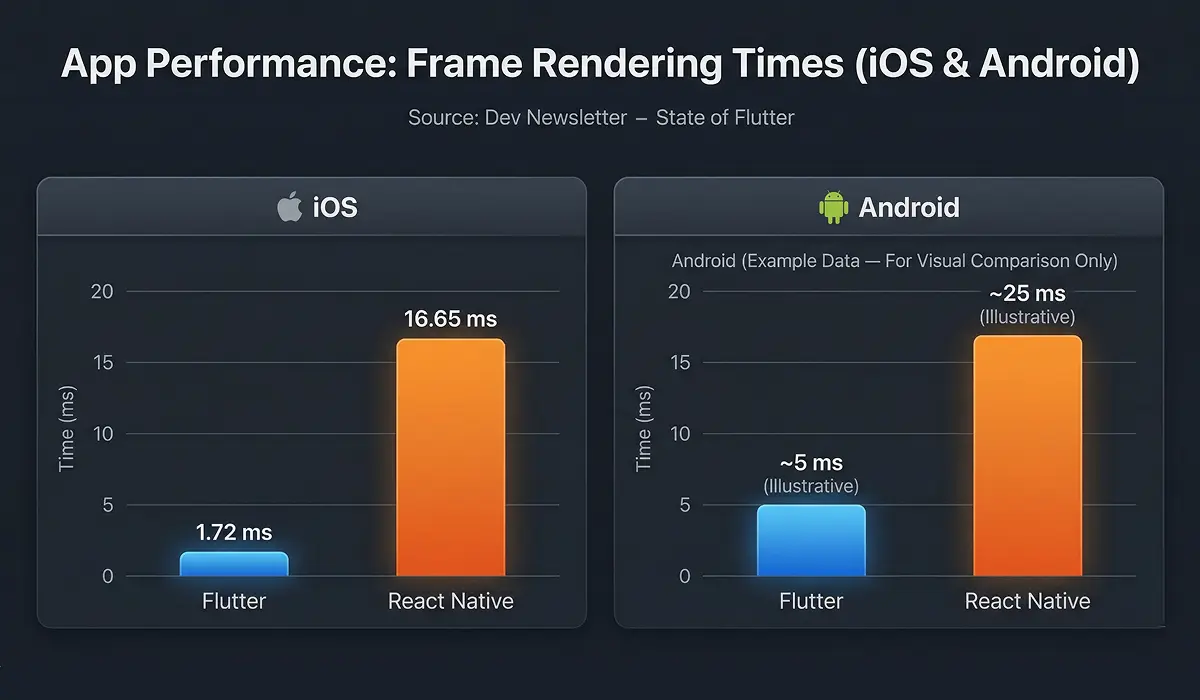
Citation Capsule: Flutter's iOS frame rendering time of 1.72ms versus React Native's 16.65ms (Dev Newsletter) gives apps built on the platform a native-level speed advantage that developers can maintain through lazy loading, image compression, and smart caching.
What Does It Really Cost Compared to Traditional Development?
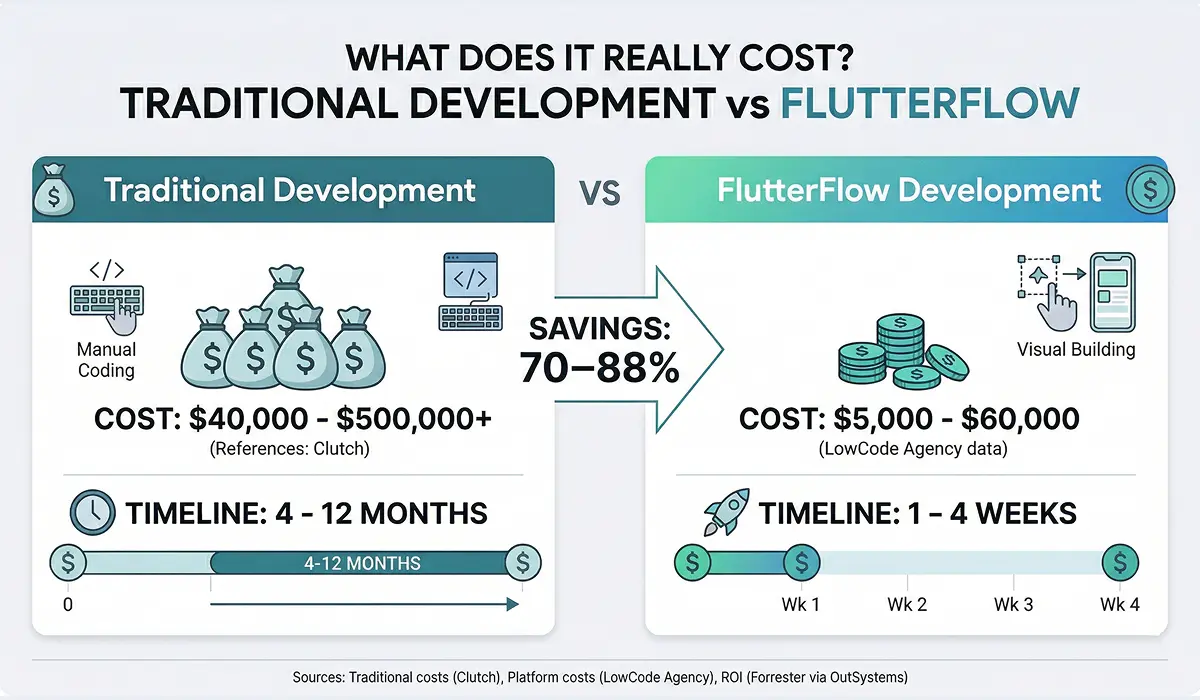
Traditional app development runs $40,000 to $500,000+ (Clutch), while apps built on the platform typically cost between $5,000 and $60,000 depending on complexity (LowCode Agency). On top of that, Forrester research shows visual and low-code platforms deliver 206-363% ROI over three years (Forrester via OutSystems). The savings are substantial and well-documented.
Detailed Cost Comparison
| App Complexity | Traditional Dev | FlutterFlow Dev | Savings |
|---|---|---|---|
| Simple MVP (5-10 screens) | $40,000 - $80,000 | $5,000 - $15,000 | 70-85% |
| Mid-Complexity (15-30 screens, integrations) | $80,000 - $200,000 | $15,000 - $35,000 | 75-85% |
| Complex App (50+ screens, custom features) | $200,000 - $500,000+ | $35,000 - $60,000+ | 80-88% |
Sources: Traditional costs from Clutch. Platform costs from LowCode Agency.
Where Do the Savings Come From?
These cost reductions aren't about cutting corners. They come from removing repetitive work:
- UI building: Drag-and-drop removes hours of manual layout coding
- Backend wiring: Firebase and Supabase connections come pre-built, not coded from zero
- Cross-platform: One codebase covers two (or three) platforms. Cross-platform development costs 30-50% less than separate native apps (CMARIX).
- Faster iteration: Changing a screen takes minutes instead of days of refactoring
Altogether, visual development approaches save $50,000-$150,000+ in Year 1 compared to traditional agency development (Newly.app). That's money you can put toward marketing, user growth, or new features.
Want an exact cost estimate for your app idea? Schedule a Call with Our Team and get a custom proposal within 48 hours.
For a detailed MVP cost analysis, see our guide on FlutterFlow developer costs for MVP projects.
Citation Capsule: Forrester's Total Economic Impact studies show visual and low-code platforms deliver 206-363% ROI over three years (Forrester via OutSystems), with FlutterFlow-built projects costing $5,000-$60,000 versus $40,000-$500,000+ for traditional methods.
What Do Real-World Success Stories Look Like?
The A.B Money meditation app reached 250,000+ users and over $100,000 in revenue, built in under two months (FlutterFlow Customer Stories). That's not a demo. That's a production app earning real money with real users.
Case Study: A.B Money App
The challenge: Build a meditation and wellness app that could compete in a crowded market, on a startup budget, with a tight launch window.
The approach: The team used the visual builder for the core UI, connected Firebase for user data and subscriptions, and added custom Dart code for audio playback features.
The results:
- Built and launched in under 2 months
- Grew to 250,000+ users
- Generated $100,000+ in revenue
- Maintained high App Store ratings
Read the full A.B Money case study for a detailed look at their architecture and growth strategy.
Case Study: Grupo Purdy
Grupo Purdy, a major automotive company, used the platform to cut their app delivery time by 80% (FlutterFlow Customer Stories). Instead of waiting months for traditional development cycles, they shipped working business apps in weeks.
This matters for enterprise adoption. Gartner predicts that by 2029, visual and low-code tools will power 80% of mission-critical applications (Gartner via ByteIota). Companies like Grupo Purdy are already proving that model works - and FlutterFlow, as a platform that generates real Flutter code, is leading the charge.
Empiric Infotech's Track Record
Across 100+ projects and over 3.13 million code edits on the platform, we've noticed clear patterns in what makes these projects succeed. The common thread isn't any single feature. It's the engineering discipline applied on top of the visual tools. Teams that treat the platform as a productivity booster - rather than a shortcut around fundamentals - consistently ship better products, faster.
To see how European startups are leveraging this approach, check out our analysis on FlutterFlow's impact on European startup ecosystems.
Citation Capsule: The A.B Money app reached 250,000+ users and generated over $100,000 in revenue after being built in under two months using FlutterFlow (FlutterFlow Customer Stories), proving the platform's ability to produce consumer apps with real users and real revenue.
When Is FlutterFlow NOT the Right Choice?
With 46% of developers choosing Flutter as their cross-platform framework (Statista), the ecosystem is enormous. But the visual layer on top of Flutter isn't the right fit for every project. Knowing its limits upfront saves you from costly direction changes weeks into a build.
Projects That Need Traditional Flutter (or Native)
- Games and 3D apps: If your app runs on a game engine (Unity, Unreal) or needs heavy 3D rendering, the visual builder can't help. You need native tools or a game framework.
- Complex custom animations: Standard motion effects are supported, but frame-by-frame custom animation design requires direct Dart coding.
- Heavy video/audio processing: Real-time editing, audio mixing, or streaming with custom codecs need low-level platform access.
- Bluetooth and IoT protocols: Basic Bluetooth works via custom code, but complex BLE protocols with custom characteristics are better handled in pure Flutter.
- Extreme compute requirements: Apps crunching millions of data points locally (scientific tools, on-device ML) may need hand-tuned native code.
Current Platform Limitations
- Package ecosystem: Not every Flutter package is available in the visual builder (though custom code fills many gaps)
- Complex state management: Very large apps with intricate state trees may outgrow the visual state tools
- Build configuration: Deep Gradle or Xcode changes require exporting the code first
- Advanced features still need developers: Custom code, complex queries, and Cloud Functions require real engineering skill
If your project falls into these categories, consider hiring dedicated Flutter developers who can build in pure Flutter with full control. We can also help you figure out whether a hybrid approach - using the visual builder for standard screens and custom Flutter for complex ones - makes sense for your specific needs.
What Should Your Production-Readiness Checklist Include?
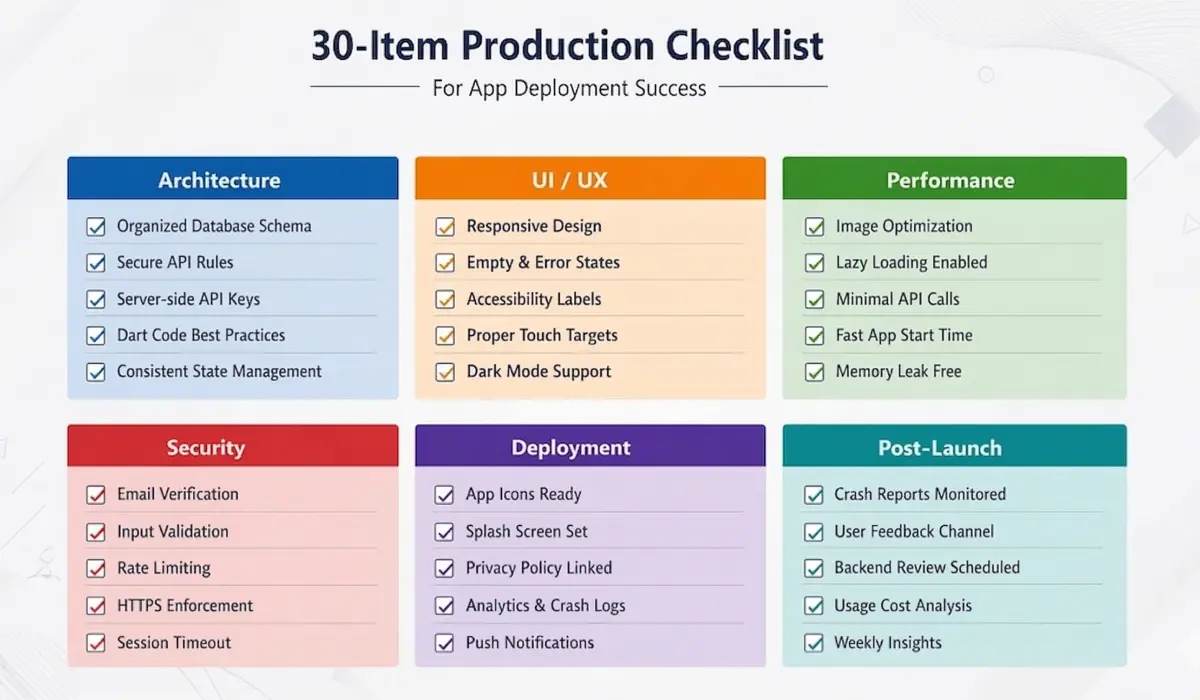
Gartner predicts 75% of new applications will use visual or low-code development by 2026 (Gartner via Kissflow). That means more apps racing toward production than ever. Before you submit to the App Store or Google Play, run through every item below. Missing even one can mean rejection, bad reviews, or security holes.
We've put this checklist together from shipping 100+ production apps on the platform. It covers the gaps that most tutorials and guides skip entirely.
Architecture and Code Quality
- Database schema is well-organized with no duplicate data
- Security Rules (Firestore) or Row Level Security (Supabase) are tested and locked down
- All API keys live server-side, not in the client app
- Custom code follows Dart best practices with proper error handling
- State management is consistent across every screen
UI/UX Standards
- Responsive layouts tested on at least 4 different screen sizes
- Empty, loading, and error states designed for every data-driven screen
- Accessibility labels added for screen readers
- All touch targets are at least 44x44 points (Apple's requirement)
- Dark mode support included (if relevant to your users)
Performance
- Images compressed and served through a CDN
- Lazy loading active on all lists and feeds
- No unnecessary API calls on screen load
- App cold start time under 3 seconds on mid-range devices
- Memory profiling done with no leaks found
Security
- Email verification required before full account access
- Input validation on all forms (both client and server)
- Rate limiting on login and sensitive API endpoints
- HTTPS enforced on all outside API calls
- Session timeout set up with a re-login flow
Deployment
- App icons generated for all required sizes
- Splash screen configured with no white flash
- Privacy policy and terms of service URLs live and linked
- Analytics and crash reporting turned on
- Push notifications tested on both iOS and Android
- App Store metadata (screenshots, descriptions, keywords) polished
- TestFlight or Internal Testing build reviewed by QA
Post-Launch Monitoring
- Real-time crash reporting dashboard monitored daily
- User feedback channel established (in-app or email)
- Weekly backend usage and cost review scheduled
Frequently Asked Questions
Is FlutterFlow good enough for production apps?
Yes - and the numbers back it up. Apps like A.B Money have reached 250,000+ users and $100K+ revenue (FlutterFlow Customer Stories). The platform generates real Flutter/Dart code that compiles to native binaries. The key is following proper engineering practices, not just dragging widgets around a screen.
How long does it take to build an app with FlutterFlow?
A simple MVP takes 1-4 weeks compared to 4-12 months with traditional development (Newly.app). Mid-complexity apps with integrations typically need 4-8 weeks. Complex enterprise apps may take 8-16 weeks - still much faster than conventional methods.
Can I export the code and own it fully?
Absolutely. The platform provides full code export of clean, readable Flutter/Dart code. You can move it to any IDE, host it in your own repo, and keep building in pure Flutter. There is zero vendor lock-in, which is a dealbreaker advantage over most competitors.
How does FlutterFlow handle app security?
The platform supports Firebase Auth, Supabase Auth, and custom login flows. However, security hardening - including database rules, API key management, and input validation - is your team's responsibility to configure properly. The tools are there; the discipline must come from you.
Is it suitable for enterprise apps?
Grupo Purdy, a major automotive company, cut delivery time by 80% using the platform for enterprise applications (FlutterFlow Customer Stories). The app layer handles the UI, while Firebase or Supabase on the backend manages data and user load. Moreover, Gartner projects that 80% of mission-critical apps will run on visual or low-code platforms by 2029 (Gartner via ByteIota).
To see how European enterprises are adopting this approach, read our analysis of FlutterFlow for European startups.
What's the difference between FlutterFlow and Flutter?
Flutter is Google's open-source toolkit for building natively compiled apps from a single codebase. FlutterFlow is a visual layer built on top of Flutter. Think of it like this: Flutter is the engine, and FlutterFlow is the steering wheel that makes it easier to drive. You get native performance without having to write every line of code by hand.
For more comparisons, see our Webflow vs. Bubble vs. FlutterFlow breakdown.
Can FlutterFlow apps connect to outside APIs?
Yes. The built-in API Manager supports REST API calls with custom headers, authentication, and JSON parsing. For more complex setups, you can write custom Dart functions. We've personally connected everything from Plaid for banking to Stripe for payments to custom enterprise APIs. See our Plaid integration tutorial for a hands-on walkthrough.
How much does it cost to build an app on this platform?
Expect to spend between $5,000 and $60,000+ depending on complexity (LowCode Agency). For comparison, traditional development runs $40,000-$500,000+ (Clutch). The biggest savings come from visual UI building, pre-built backend connectors, and single-codebase cross-platform deployment.
Do I need a developer to use FlutterFlow?
For production-grade apps, yes. The platform lowers the entry bar for development, but shipping a reliable app still needs proper architecture, security setup, performance tuning, and custom code for advanced features. A skilled developer who knows the platform delivers results that a non-technical user typically can't match.
What happens if FlutterFlow shuts down?
Because the platform offers full code export, your app's code lives independently of the service. You'd simply continue building in standard Flutter/Dart using any IDE. This is a major advantage over traditional no-code and low-code tools that don't let you export code - with those, a shutdown means starting over from scratch.
Conclusion: Ship Faster Without Cutting Corners
The visual and low-code development market is heading toward $44.5 billion by 2026 (Gartner via InfoWorld). That's not a passing trend - it's a fundamental shift in how software gets built. FlutterFlow, as a visual development platform that generates real Flutter code, sits at the forefront of that shift - giving teams a way to ship launch-grade apps in weeks rather than months.
But the tool alone isn't enough. Production-ready means careful architecture, tight security, smart performance tuning, and thorough testing. Skip those basics and even the best platform will produce fragile apps that disappoint users.
The seven steps in this guide - from architecture planning through App Store deployment and post-launch monitoring - reflect the same process we follow across every project. It works because it treats visual development as a way to accelerate good engineering, not replace it.
We Empiric Infotech LLP an Official FlutterFlow Expert Agency Partner with 100+ successful projects and over 3.13 million code edits, Empiric Infotech can take your app from concept to App Store in weeks, not months. Hire FlutterFlow Developers and start your 7-day risk-free trial today.


![How to Build a Personal Finance App Using FlutterFlow [6 Steps Guide]](/_next/image?url=%2Fapi%2Fimage%2Fapp%2Fmedia%2Fblog%2F1731994707413_How%20to%20build%20personal%20finance%20app%20using%20flutterflow.png&w=2048&q=75)