
What is FlutterFlow? [How is it Different from Flutter?]

Home Blogs

Mobile App Development

Last Updated: November 05, 2024

What is FlutterFlow? [How is it Different from Flutter?]
Table of Content

Flutter, Google's UI toolkit, has rapidly gained popularity among developers. It's loved for enabling the creation of stunning, performant apps for multiple platforms (Android, iOS, Web, and Desktop) from a single codebase. Flutter's focus on beautiful, customizable UIs ensures that your app doesn't just function well but looks great too.

However, while Flutter offers immense power, directly coding every screen and interaction can be time-consuming – especially in the early stages of app development.

This is where rapid prototyping becomes crucial. It allows you to quickly test ideas, get user feedback, and iterate on your design without getting bogged down in complex code from the outset.

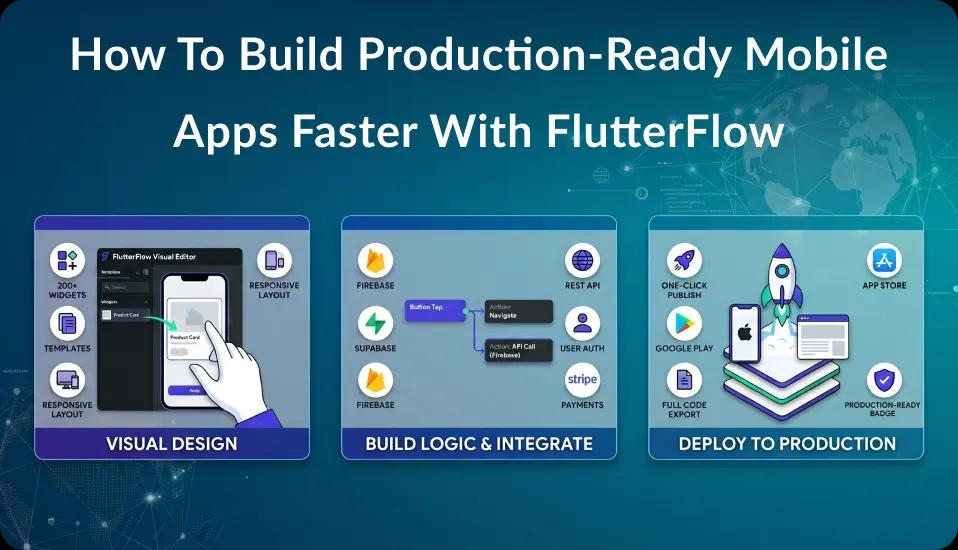
FlutterFlow addresses this need perfectly. It's a visual app builder that works seamlessly with the Flutter framework. FlutterFlow significantly speeds up the initial development process by providing a drag-and-drop interface, pre-built UI components, and powerful integrations.

This means you can build a working version of your app incredibly fast, validating concepts and gathering insights before diving deep into the code.

What is FlutterFlow?

FlutterFlow is a powerful visual code builder and mobile app development tool that allows designers and developers to build high-quality mobile and web applications quickly and efficiently. It's a visual development platform, often described as low-code or no-code, designed to work together with the Flutter framework.

What are the Key Features of FlutterFlow?

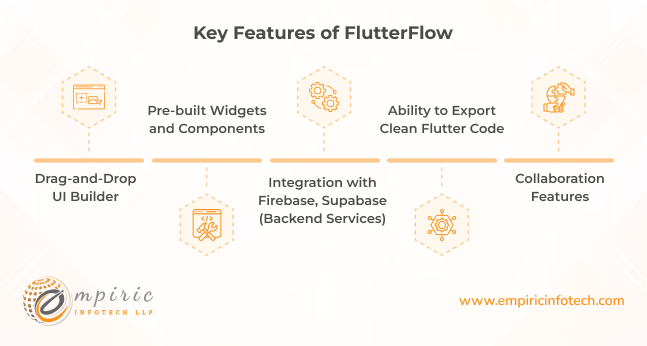
Key Features of FlutterFlow?

Here are some features of FlutterFlow that make it special.

Drag-and-Drop UI Builder

  • Build UIs Visually

    Construct your app's screens and layouts with an intuitive drag-and-drop interface. Forget about manually writing code to position buttons, adjust text styles, or arrange images.

  • Speed and Ease

    Drastically reduces the time spent on UI development, allowing you to focus on your app's core logic and unique features.

  • Customization Options

    While it accelerates design, FlutterFlow still offers flexibility to modify widget properties and styles, ensuring your app looks exactly how you intended.

Pre-built Widgets and Components

  • Ready-to-use Building Blocks

    FlutterFlow provides an extensive library of common UI elements like buttons, text fields, navigation bars, lists, and more.

  • Save Development Time

    Avoid reinventing the wheel. Instead of coding these elements from scratch, simply drag and drop them into your design.

  • Professional Look

    These pre-built widgets follow the design guidelines of both Android and iOS, ensuring your app looks polished and native to each platform.

Integration with Firebase, Supabase (Backend Services)

  • Simplified Backend

Connect your app to powerful backend services like user authentication, real-time databases, storage, and cloud functions with just a few clicks.

  • No Server-Side Coding

    Handle complex backend tasks through FlutterFlow's visual interface, eliminating the need to master server-side programming languages or manage your own infrastructure.

  • Scalability

    Firebase is a robust platform built to handle apps of all sizes, ensuring that your app can grow with your user base.

Ability to Export Clean Flutter Code

  • No Lock-in

    FlutterFlow isn't a walled garden. You always have the option to export your project as clean, well-structured Flutter code.

  • Full Customization Potential

    Developers can dive into the generated code and build custom widgets, add complex logic, or create unique features that go beyond FlutterFlow's visual tools.

  • Best of Both Worlds

    Start fast with visual development, and switch seamlessly to code-based development when your project's complexity increases.

Collaboration Features

  • Team-Friendly Environment

    FlutterFlow allows designers, developers, and stakeholders to work on the same project simultaneously.

  • Real-Time Updates

    Changes made by one team member are instantly reflected for everyone else, promoting a seamless workflow.

  • Feedback and Iteration

    Built-in commenting and feedback mechanisms enable easy communication within the project, speeding up the design and development process.

When to Choose FlutterFlow?

If you’re deciding whether FlutterFlow is the right choice for your next project, it helps to know what it can do best and when to use it. FlutterFlow is a low-code platform built on top of Flutter, which makes it possible to build web and mobile applications quickly. Here’s when FlutterFlow could be a good fit for your needs:

When to Choose FlutterFlow

1. Building an MVP Quickly

If you need to create a Minimum Viable Product (MVP) to test your idea, FlutterFlow is a great option. It allows you to build fully functional apps without writing much code.

You can use its drag-and-drop interface to create screens, design user interfaces, and connect your app to APIs or databases. This makes it possible to get a working version of your app in front of users faster, gather feedback, and iterate on your idea quickly.

2. Limited Development Budget

For startups or small businesses, hiring a large development team can be expensive. FlutterFlow allows you to build cross-platform apps (for iOS, Android, and the web) with a single codebase, which means you don’t need separate teams for each platform. This can save a lot of money, especially in the early stages when you want to maximize your resources.

3. Need for a Customizable UI

If your app requires a unique design or a user-friendly interface, FlutterFlow can help you create exactly what you want. It provides pre-built components and design templates, but you can also customize them as much as you like. This is especially useful when you want to create an app that stands out visually or has specific user interface needs.

4. Teams with Mixed Technical Skills

FlutterFlow can be a good choice if your team includes people with different levels of technical expertise. Designers can use FlutterFlow to build the front end of the app directly, while developers can focus on more complex backend logic if needed. This makes collaboration smoother since designers don’t have to rely on developers for every small UI change.

5. Apps Requiring Fast Iteration

If your app needs to be updated frequently or you want to try out different features based on user feedback, FlutterFlow is a good fit. Its visual interface allows you to make changes quickly, deploy updates, and see the results almost immediately. This can be very helpful for apps that need to adapt quickly to changing user needs or market conditions.

6. Planning to Transition to Native Code

FlutterFlow is ideal if you want to start with a visual development approach but might need to move to custom coding later. You can export the FlutterFlow project to native Flutter code, giving you the flexibility to continue development using more traditional methods if your app becomes more complex. This makes it easy to start simple and scale up as needed.

7. Building Apps with Basic to Moderate Complexity

FlutterFlow is best suited for apps that have moderate complexity, like e-commerce apps, social media platforms, or simple tools that don't require deep customization in every feature. While it’s not ideal for very complex projects that require a lot of custom logic, it can handle most common app features like user authentication, databases, and simple animations.

8. Integrating with Third-Party Services

FlutterFlow supports integration with popular APIs and services like Firebase, REST APIs, Stripe, and more. If your app needs to connect to external services for features like payment processing, user authentication, or data storage, FlutterFlow can simplify these integrations, saving you time and reducing the amount of custom code you need to write.

Who Can Benefit Most from FlutterFlow?

FlutterFlow is a versatile platform that can help various types of users create mobile and web applications with minimal coding. It’s designed to simplify app development while maintaining flexibility, making it useful for different kinds of projects and needs. Here’s a look at who stands to benefit most from using FlutterFlow:

 Who Can Benefit Most from FlutterFlow

1. Startups and Entrepreneurs

Startups and entrepreneurs often need to launch products quickly and on a tight budget. FlutterFlow can be a great choice for Startups because it allows rapid creation of prototypes and MVPs (Minimum Viable Products).

By using its drag-and-drop interface, startups can build a functional app, test it with users, and iterate on the design based on feedback. This saves time and money compared to hiring a large development team right from the start.

Plus, with FlutterFlow’s support for cross-platform development, you can release your app on iOS, Android, and the web using a single codebase.

2. Non-Technical Founders and Small Business Owners

For non-technical founders or small business owners who have great app ideas but lack coding skills, FlutterFlow makes app development accessible. You don’t need to write complex code to create a polished, functional app.

Instead, you can use FlutterFlow’s visual interface to design screens, set up navigation, and integrate basic functionality like user logins and data storage. This means you can turn your app idea into reality without relying on external developers for every change or update.

3. Freelancers and Independent Developers

Freelancers and independent developers who build apps for clients can use FlutterFlow to speed up their workflow and deliver projects faster. By leveraging FlutterFlow’s pre-built templates and components, freelancers can create apps more efficiently, allowing them to take on more projects or focus on building custom features that add real value.

Additionally, because you can export the code from FlutterFlow, developers have the flexibility to start with visual design and then fine-tune or expand on it using native Flutter if needed.

4. Designers Who Want More Control

Designers who want more control over the app creation process can benefit from using FlutterFlow. Instead of handing off their designs to developers and waiting for implementation, designers can use FlutterFlow to directly build the user interface as they envision it.

This makes it easier to achieve the exact look and feel they want without going back and forth with developers. Plus, with its integration with Flutter widgets, designers can create beautiful animations and smooth transitions that would otherwise require more coding expertise.

5. Product Managers and Team Leads

Product managers and team leads who need to manage app development can use FlutterFlow as a tool for rapid prototyping and testing new features. It allows teams to quickly create a version of an app feature, get feedback from users, and iterate based on that feedback.

This helps teams stay agile and responsive to market needs. Additionally, because FlutterFlow is easy to learn, it can serve as a common ground for collaboration between developers, designers, and stakeholders, allowing everyone to contribute to the app’s design and functionality.

6. Educational Institutions and Teachers

FlutterFlow can be a valuable resource for educational institutions or teachers looking to introduce students to app development. Its visual nature makes it easier for beginners to understand the basics of app design and logic without getting overwhelmed by complex programming concepts.

Students can quickly see the results of their work and understand how changes to the UI or logic impact the app. This can make learning app development more engaging and hands-on.

7. Businesses Looking for Internal Tools

Companies that need custom internal tools or apps can use FlutterFlow to build them quickly. For example, if your business needs a simple inventory management system, a staff scheduling app, or a data visualization tool, you can create it in FlutterFlow without the need for a large IT team.

Since it supports backend integrations like Firebase, it’s easy to connect the app to a database and ensure it’s secure and reliable.

8. App Developers Exploring Low-Code Solutions

Developers who are curious about no-code or low-code platforms can find FlutterFlow to be an excellent way to explore these tools without completely moving away from traditional coding.

Since FlutterFlow is built on top of Flutter, developers can leverage the visual interface for rapid prototyping and then dive into the underlying code if they want to add advanced features.

This makes it a good middle ground for developers looking to balance speed with the need for custom functionality.

What is Flutter?

Flutter is Google's open-source UI software development kit (SDK). It is used to create visually appealing, natively compiled applications for mobile (Android and iOS), web, desktop (Windows, macOS, Linux), and embedded devices from a single codebase.

Flutter vs FlutterFlow - Key Differences

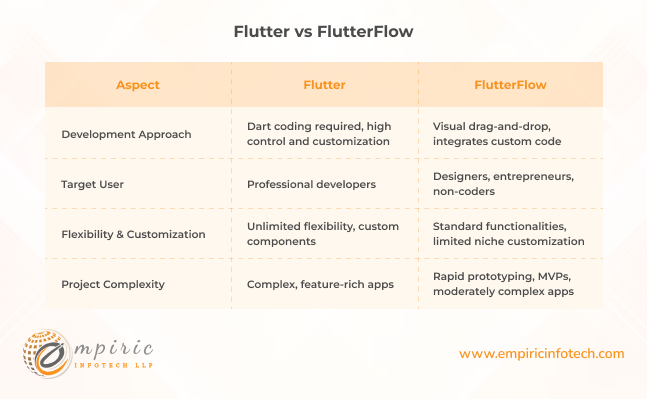
Flutter vs FlutterFlow - Key Differences

Development Approach

Flutter: Built around the Dart programming language, Flutter requires developers to write code to define the app's structure, functionality, and visual elements. This offers a high degree of control and customization potential.

FlutterFlow: Provides a primarily visual drag-and-drop interface for building apps. Users can arrange pre-built UI components, connect data sources, and define logic without needing extensive coding knowledge. However, developers can integrate custom code for advanced functionality.

Target User

Flutter: Primarily geared toward professional developers with programming experience. It's ideal when you need full control or want to create truly unique apps.

FlutterFlow: Accessible to a wider audience, including designers, entrepreneurs, and those with limited coding experience. It streamlines app development and empowers non-technical users to bring their ideas to life.

Flexibility and Customization

Flutter: Offers virtually unlimited flexibility for customization. Developers can build completely custom components, fine-tune animations, and implement any feature imaginable.

FlutterFlow: Excels in quickly building apps with common UI patterns and standard functionalities. While customization is possible through code and third-party integrations, it might have limitations in extremely niche and complex scenarios.

Project Complexity

Flutter: Ideal for complex, feature-rich applications that require a high level of customization and performance optimization.

FlutterFlow: Perfect for rapid prototyping, validating ideas (MVPs), and building apps with moderate complexity. Its visual approach enables faster development cycles for initial projects or proof-of-concepts.

Hire FlutterFlow Developers with Empiric Infotech

Choosing between FlutterFlow and Flutter for your project requires careful consideration. FlutterFlow and Flutter aren't competitors but rather powerful options that excel in different scenarios.

At Empiric Infotech, we are a FlutterFlow expert agency partner, and our FlutterFlow experts are ready to help you select the right approach for your unique needs.

Our skilled developers possess deep experience in both Flutter and FlutterFlow. We can guide you through the decision-making process, provide tailored development solutions, and help you maximize the potential of these tools.

If you're ready to bring your app vision to life, schedule a FREE consultation with our expert. Let's explore how we can help you in your project!

Related Blogs

GET A QUOTE NOW

Tell us about your challenges, and we’ll come up with a viable solution!

Phone
0 / 1000
Attach a filePDF, DOC, or image. Maximum 10 MB.

We respond within one business day. Your details stay confidential.