



 Front-end
 Back-end
 Full Stack Developer
 Mobile
 Other
Other


 Company
 Contact Us
Most n8n use cases fail in production for one reason: throughput. In n8n's own scalability benchmark, a single mode instance on a c5.4xlarge peaked at 23 requests per second with a 31% failure rate, while queue mode on the same hardware held 162 requests per second with zero failures. The use cases that survive are sized for that gap.
The short answer
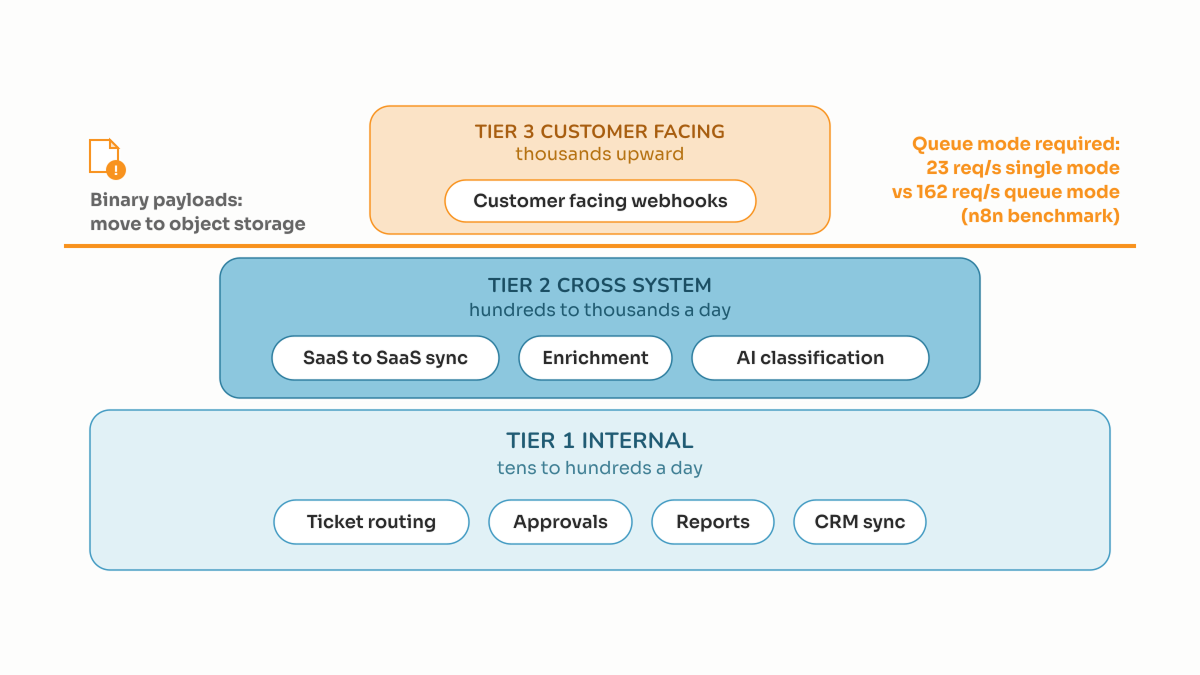
- Internal, low volume, human triggered work is the safe zone. Ticket routing, onboarding checklists, report assembly, CRM hygiene. These run tens to hundreds of times a day, and a failure is an annoyance, not an incident.
- Customer facing webhooks are the hard case. n8n's benchmark measured 23 requests per second and a 31% failure rate in single mode on a c5.4xlarge running ten webhook workflows.
- Queue mode is the dividing line. On the same hardware, queue mode held 162 requests per second with zero failures. Anything on a customer path needs it.
- Binary payloads do not scale the same way. In that benchmark, file uploads on a c5.large failed 87% of the time in queue mode, worse than the 74% in single mode. Files belong in object storage.
- AI agent workflows need evals and guardrails before traffic. Gartner predicted in June 2025 that over 40% of agentic AI projects will be canceled by the end of 2027, citing escalating costs and inadequate risk controls.
- Ownership is the real failure mode. A workflow nobody is accountable for is an outage waiting for quarter end.
Published 22 September 2026.
If you want the build, the self hosting, and the on call story handled as one piece of work, that is what our n8n workflow automation service does.
Which n8n use cases actually survive production?
The n8n use cases that survive production share three traits: bounded volume, a tolerable blast radius on failure, and no need for exactly once writes. What separates them from the broken ones is rarely the node list, it is the volume shape.
| Use case | Typical volume | Survives when | Usually fails when |
|---|---|---|---|
| Internal ops routing (tickets, approvals) | Tens to hundreds a day | Retries are safe, a human notices a gap | It becomes the only record of the decision |
| SaaS to SaaS data sync (CRM, billing) | Hundreds to thousands a day | Writes are keyed on an external ID | No dedupe key, so replays create duplicates |
| Scheduled reporting and digests | A handful a day | A late run is fine | It drives a payment or a filing |
| Lead enrichment and scoring | Hundreds a day | Failures degrade quietly | A missing field blocks the whole record |
| Document and file processing | Varies | Files move as object storage links | Large binaries pass node to node |
| AI classification, extraction, drafting | Hundreds to thousands a day | Outputs are scored against a fixed test set | The prompt changes in production with no eval |
| Customer facing webhook endpoints | Thousands upward | Queue mode, webhook processors, idempotent handlers | Single mode, one instance, no dead letter path |
The honest read: n8n is excellent glue between systems, and a poor place for a system of record.
Which n8n use cases break first?
The n8n use cases that break first are the ones touching money, files, or a customer's open browser tab. All three share a property: the failure is visible outside your company, and a retry is not free.
Money paths break because a workflow retry is not an idempotent write. If a billing sync re-runs after a timeout and the downstream API has no idempotency key, you have double charged someone. The invariant belongs in the target system.
File paths break on memory. n8n's own benchmark is candid here: on a c5.large, binary uploads failed 87% of the time in queue mode against 74% in single mode. Queue mode distributes execution, it does not shrink a payload. Pass a signed object storage URL between nodes instead.
Customer facing latency breaks because a synchronous workflow inherits its slowest node. Any step calling a model or a rate limited API should be acknowledged immediately, then processed off the request path.
Do I need n8n queue mode, and when?
You need queue mode as soon as a workflow sits on a customer path or exceeds roughly two dozen executions per second. n8n's benchmark is the evidence for that threshold: single mode on a c5.4xlarge peaked at 23 requests per second with a 31% failure rate across ten webhook workflows, while queue mode on identical hardware sustained 162 with none.
Queue mode is not a config flag. It means Redis as the broker, a main process that only serves the editor and API, worker processes that execute, and separate webhook processors so an inbound request is never stuck behind a long job. n8n's production guidance says to watch queue depth, worker CPU and memory, and execution times at p50, p95 and p99.
If nobody wants to own a Redis cluster and a worker fleet, that is a legitimate answer. It is also the point where this becomes an engineering line item, not a side project.
How do I score an n8n use case before we build it?
Score it out of 60 across six dimensions, ten points each, and refuse to put anything below 42 on a customer path. The score is not a prediction of success, it is a filter catching the workflows that page someone at 3am.
| Dimension | 10 points looks like | 0 points looks like |
|---|---|---|
| Idempotency | Re-running on the same input changes nothing downstream | A replay creates a duplicate or a second charge |
| Failure path | Every node has an error branch, an error workflow is attached | Failures are silent, found by a customer |
| Observability | Failures alert a named channel, "did it run" is answerable outside n8n | Proof of execution lives only in the n8n UI |
| Payload discipline | Small JSON payloads, files moved by reference | Multi megabyte binaries pass node to node |
| Credentials and access | Scoped, rotated on a schedule, owned by your accounts | Shared API keys created by whoever built it |
| Ownership and change control | A named engineer owns it, changes reviewed and versioned | Edited live by anyone with a login |
Scoring: 42 or above, ship it. Between 30 and 41, ship internally only and close the gaps before it touches a customer. Below 30, do not build it yet, the requirement is not clear enough.
What breaks after launch that nobody plans for?
Three things break after launch, none of them visible in a demo. The first is your audit trail. n8n prunes execution data by default: EXECUTIONS_DATA_MAX_AGE defaults to 336 hours, which is 14 days, and EXECUTIONS_DATA_PRUNE_MAX_COUNT defaults to 10,000 finished executions. If an auditor asks what happened eleven weeks ago, the default configuration cannot answer.
The second is retry behavior. n8n's production guidance recommends exponential backoff, one second, then two, then four, capped at three to five attempts, with fallback models when a primary LLM call fails. Prototypes rarely have this, so a five minute outage becomes a day of silently dropped work.
The third is model cost drift on AI workflows. A step that costs little at pilot volume becomes a cost conversation at production volume, and the usual response is to swap in a smaller model without re-running any evaluation. MIT's Project NANDA report, "The GenAI Divide: State of AI in Business 2025", published July 2025 and drawing on 52 executive interviews, 153 leader surveys, and 300 public AI deployments, found roughly 95% of enterprise generative AI pilots produced no measurable P&L impact. The gap was integration and feedback, not model quality.
Should this live in n8n at all, or in application code?
Put it in n8n when the work crosses system boundaries and changes more often than your release cycle. Put it in application code when the logic is a core business rule, needs transactional guarantees, or has to be tested in CI with the rest of your product.
- n8n: integrations, notifications, scheduled jobs, internal routing, enrichment, AI steps with a human review gate, anything a non engineer needs visibility into.
- Application code: pricing, entitlements, billing writes, auth, anything with a legal or financial invariant, anything that must run in a database transaction.
- Either, decided by team: ETL into a warehouse, document pipelines, AI agent workflows where the orchestration is genuinely dynamic.
The failure to avoid is business logic living half in each place. When a rule is written once in a workflow and once in a service, they drift, and a customer finds it first.
What does it cost to have a dedicated engineer own this?
An AI automation engineer from Empiric Infotech is USD 2,000 a month in the US and India, EUR 2,000 in Europe, and AUD $3,000 in Australia, for 160 to 172 hours of one named, full time, exclusive engineer, billed monthly upfront. If you would rather buy a defined scope by the hour, standard engineering is USD 15 an hour and AI work is USD 25, billed in Australia at AUD $25 and AUD $40.
What that engineer does here: stands up queue mode with Redis and webhook processors, puts every workflow under version control with a review step, adds error workflows and alerting, sets execution data retention to what compliance requires rather than the 14 day default, and builds the evaluation set for any AI step. A senior team lead reviews and tests every release.
The engagement is month to month, cancel on seven days notice, with a seven day risk free trial. You keep the repository, the cloud accounts, and the model API keys. If you would rather scale an existing team, the same terms apply to hiring a dedicated developer who joins your standups and your board.
Run the scorecard on the workflow you are most worried about. If it scores under 42, that is the conversation worth having.
Sources: n8n scalability benchmark and AI agent production guidance (blog.n8n.io); n8n docs on execution data; Gartner press release, 25 June 2025; MIT Project NANDA, "The GenAI Divide", July 2025.