



 Front-end
 Back-end
 Full Stack Developer
 Mobile
 Other
Other


 Company
 Contact Us
Imagine you're a developer, building something cool. You need a tool to run other programs from your code. So you head to open-source libraries that are readily available packages.
However this ecosystem fosters innovation and efficiency, but it also creates vulnerabilities that malicious actors can exploit. The recent "child_process" scam on the npm registry serves as a stark reminder of the importance of vigilance and security best practices.
This article deeply discusses the "child_process" scam, analyzing its mechanics, potential consequences, and most importantly, how to protect yourself from such threats.
Understanding the childprocess Package - Legitimate One
The legitimate "childprocess" package is a core module within the Node.js environment. It empowers developers to spawn child processes, allowing them to execute external programs or scripts from within their Node.js application. This functionality proves invaluable for various tasks, including:
=> Launching system commands
=> Running background processes
=> Interacting with external programs
But some sneaky people made a fake "child_process" that looked just like the real one. This fake tool could have done some nasty things:
The Malicious Twist - Fake child_process packages
Deceptive actors capitalized on the recognition of the "childprocess" name by publishing malicious packages under the same moniker. These fake packages, despite appearing legitimate at first glance, harbored nefarious functionalities. Here's what we know about the potential threats:
Social Engineering
The familiar name likely tricked developers into installing the malicious package, assuming it was the standard "childprocess" module. This tactic plays on human trust and the fast-paced nature of software development.
Hidden Malicious Code
The true purpose of the fake package could have been to conduct malicious activities on the unsuspecting developer's system. Potential actions might have included:
System Scanning: The package could have scanned the system for sensitive information like file structures, software versions, or even network configurations.
Environment Variable Theft: Environment variables often store critical details like API keys or database credentials. The fake package could have extracted this valuable information.
Private Key Extraction: In a worst-case scenario, the malicious code might have targeted private keys used for digital signatures or secure connections.
Thankfully, npm, the primary package manager for Node.js, has removed the malicious "child_process" packages. However, this doesn't guarantee complete safety.
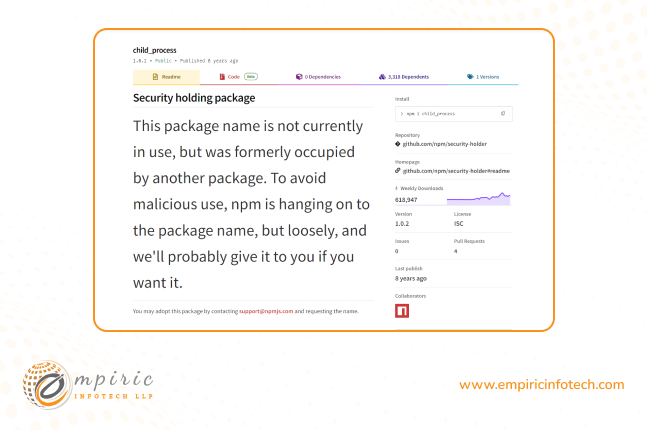
Source: npm, child_process package
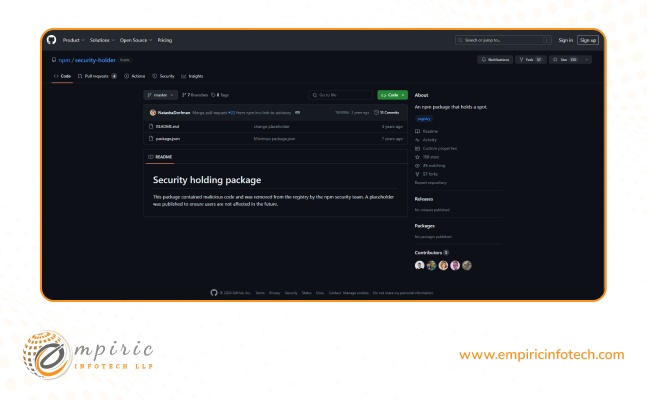
Source: npm security holding package
The Forking Threat - Why Vigilance Remains Crucial
While the original malicious package might be gone, the threat of forked versions persists. Forking, in the context of npm packages, allows developers to create their own versions based on existing code. Unfortunately, malicious actors can exploit this feature by forking a legitimate package and injecting harmful code.
Here's why vigilance remains crucial:
Unpredictable Content: Forked versions, especially those from untrusted sources, can contain hidden malicious code. This code could execute upon installation, potentially compromising the system.
Difficult Detection: Forked packages often retain the original name, making them difficult to distinguish from the legitimate version. This lack of clear differentiation increases the risk of accidental installation.
How Scammers Reach Out
These same scammers might also try to target you directly. Here are a couple of red flags to watch out for:
Tempting Offers on LinkedIn: A stranger contacts you on LinkedIn with a seemingly perfect project. They might offer a high fee and ask you to run their code, which could be a malicious package in disguise.
Shady Source Code on Freelancer Platforms: On platforms like Upwork or Freelancer, someone might share a public Github repo, Google Drive link, or a zip file containing source code and ask you to run the app. This code could harbor hidden dangers.
Be Mindful of Dependencies or Fork packages
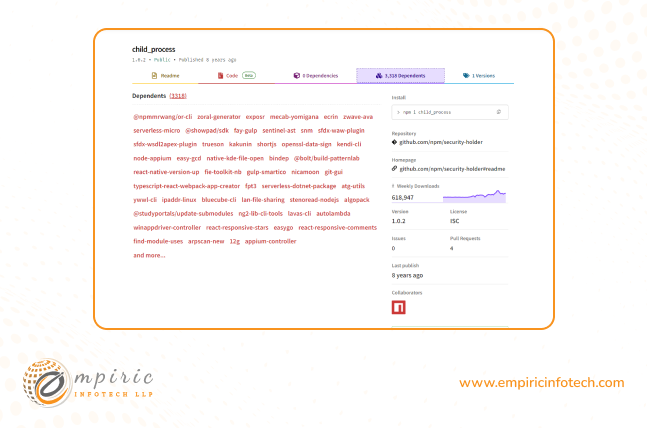
Before incorporating any dependency into your project, take a moment to research its origin, reputation, and the code it includes. This vigilance can help you avoid unknowingly introducing vulnerabilities into your application. On a team, that check only happens reliably when one engineer owns the dependency list week to week, which is why the dedicated Node.js developers we place work full-time on a single codebase rather than across many.
For a complete list of fork packages directly dependent on "child_process," you can refer to the official npm page linked here: https://www.npmjs.com/package/child_process?activeTab=dependents
Safeguarding Yourself - Best Practices to Mitigate Risks
There are several ways developers and IT professionals can protect themselves from falling prey to malicious package scams:
Scrutinize Before Installing: Don't blindly trust package names. Take the time to read the package.json file associated with any dependency. Look for inconsistencies or unfamiliar details in the description, author information, or dependencies listed.
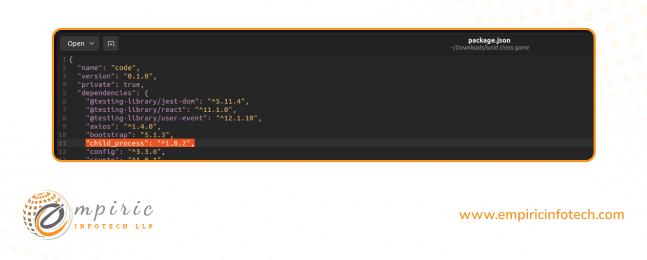
Research Package Reputation: Before installing a package, especially one with a common name like "child_process", conduct a quick online search. Look for reviews, documentation, and community discussions about the package. A well-maintained package with a positive reputation is a safer bet.
Consider Alternatives: For functionalities similar to the "child_process" module, explore established and well-regarded alternatives. Popular options include execa or cross-spawn. These packages offer similar features while undergoing stricter security reviews.
Review Code Execution: Be cautious of code that executes shell commands. Always understand the specific command being used and its potential security implications. Consider safer alternatives like dedicated libraries for interacting with external programs.
Maintain Updated Dependencies: Keep your project's dependencies up-to-date. Patch updates often address security vulnerabilities discovered in older versions. Utilize tools like npm audit to identify outdated or potentially risky dependencies.
Implement Multi-Factor Authentication (MFA): Enforce multi-factor authentication on your npm account. This adds an extra layer of security by requiring a second verification step beyond just your password in order to publish or install packages.
Stay Informed: Keep yourself updated on the latest security threats within the npm ecosystem. Subscribe to reliable security blogs or forums to stay informed about vulnerabilities and malicious packages. Reporting suspicious activity to the npm security team also plays a crucial role in keeping the community safe.
Beyond npm - Holistic Security Measures
While the focus of this article has been on the npm registry, security best practices extend beyond a single package manager. Here are some additional considerations:
Secure Coding Practices: Adhere to secure coding principles throughout your development process. This includes input validation, proper error handling, and avoiding practices that could introduce vulnerabilities like SQL injection or cross-site scripting (XSS).
Code Reviews: Implement code review procedures within your development team. This allows for peer scrutiny of code and helps identify potential security issues before deployment.
Regular System Audits: Conduct periodic security audits of your development environment and systems. These audits can help detect vulnerabilities and misconfigurations that could be exploited by malicious actors.
Also read: Goheard keylogger App Scam
Conclusion
The "child_process" scam is just one example. By combining these practices with the npm-specific recommendations outlined earlier, developers and IT professionals can create a robust security posture that minimizes the risk of falling victim to package scams and other cyber threats. Stay aware and stay safe.
Who owns your npm dependency list?
Supply-chain checks hold up when one engineer has been on the codebase long enough to notice a package that was not there last month. Empiric Infotech places dedicated Node.js developers full-time and exclusively on a single product at $2,000 USD per month for 160 to 172 hours, billed monthly upfront. Most engagements run 6 to 18 months, which is what makes that kind of ownership possible in the first place.