



 Front-end
 Back-end
 Full Stack Developer
 Mobile
 Other
Other


 Company
 Contact Us
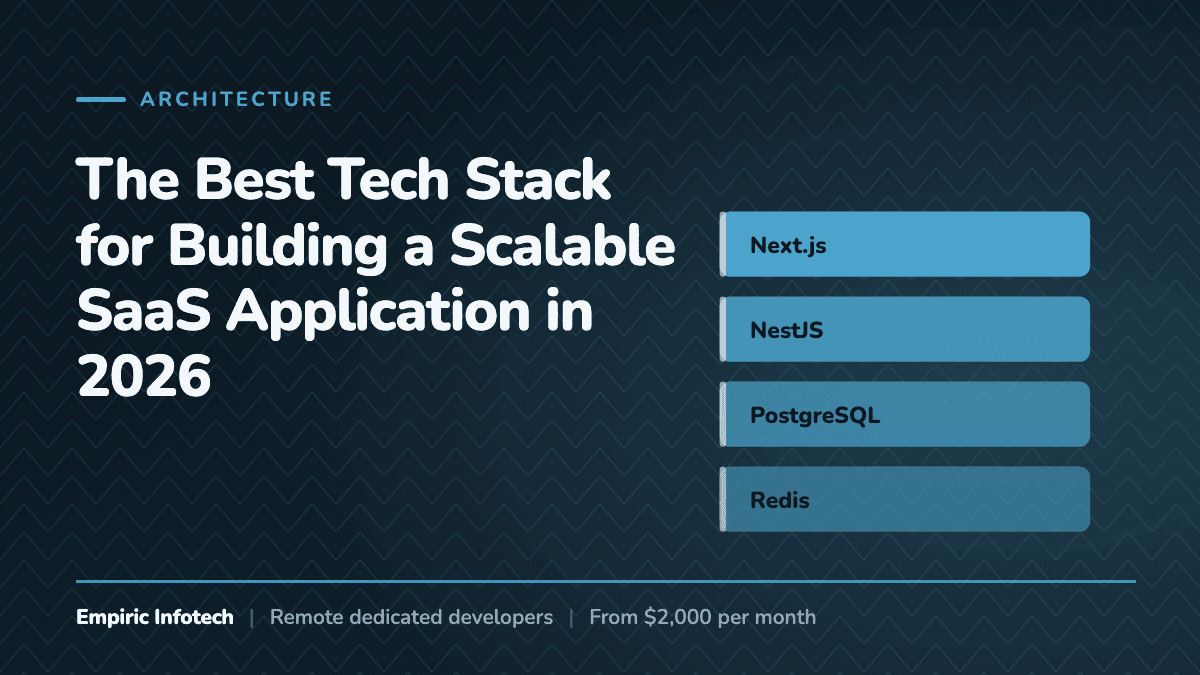
Quick Answer: What Is the Best Tech Stack for Building a SaaS Application?
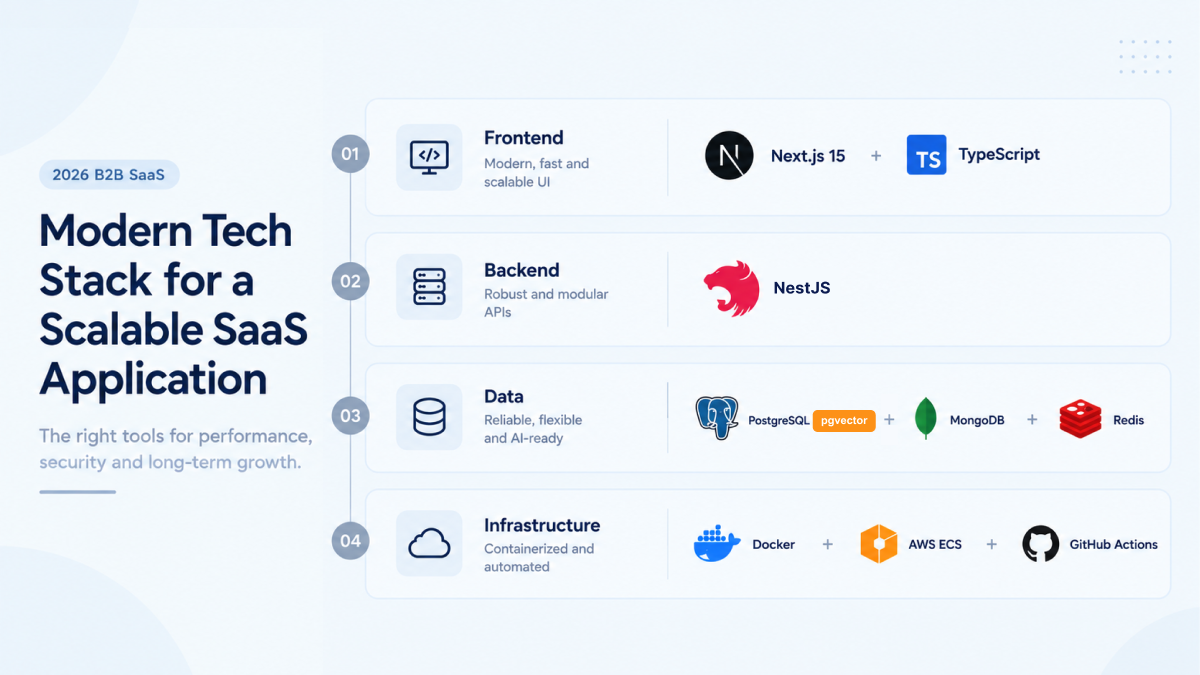
For most B2B SaaS startups in 2026, the optimal stack combines Next.js (frontend), NestJS (backend), PostgreSQL (primary database), Redis (caching/queues), and MongoDB (for document-oriented needs) - giving you SEO power, scalability, and AI readiness. If you're looking to build with this modern stack, you might consider hiring dedicated Next.js developers or Node.js backend experts.
However, the classic MERN stack (MongoDB, Express.js, React, Node.js) remains a strong choice for lean MVPs where speed to market is the only priority and SEO is less critical. If you're considering this path, you can explore our MERN Stack Development services.
This guide provides a decision framework, not dogma. You'll learn exactly which stack fits your specific SaaS requirements, traffic projections, and team composition.
Best Tech Stack for SaaS in 2026 (Quick Summary)
For most modern SaaS platforms, a balanced architecture looks like this:
| Component | Technology |
|---|---|
| Frontend | Next.js + TypeScript |
| Backend | NestJS or Node.js APIs |
| Database | PostgreSQL (with pgvector for AI features) |
| Caching & Queues | Redis + BullMQ |
| Authentication | NextAuth / Auth0 |
| Infrastructure | Docker + AWS ECS or Kubernetes |
Why Choosing the Right Tech Stack Matters
The technology stack you choose shapes every aspect of your SaaS business:
- Development speed - How fast can you ship features and iterate based on user feedback?
- Scalability - Will your architecture hold up when you grow from 100 to 100,000 users?
- Hiring - Can you find developers familiar with your stack?
- Infrastructure costs - Are you overpaying for unnecessary complexity?
- Security & compliance - Does your stack support enterprise-grade requirements?
Getting this decision right from day one saves months of refactoring and prevents expensive mistakes. At Empiric Infotech, a custom software development agency working with SaaS teams across the USA, Europe, and Australia, it is the first thing we pressure-test on a new build, because a wrong call in week one becomes a rewrite in month nine.
What Is a SaaS Tech Stack?
A SaaS tech stack is the combination of technologies used to build and operate a software-as-a-service platform. It typically includes:
- Frontend framework - What users see and interact with.
- Backend framework - Handles business logic, API endpoints, and integrations.
- Database - Stores application data.
- Infrastructure - Hosting, scaling, and deployment tools.
- Authentication - User identity and access management.
- Analytics - Tracks user behavior and system performance.
- Background job processing - Handles time-consuming tasks asynchronously.
Each layer must work together seamlessly to deliver a reliable, fast, and secure product.
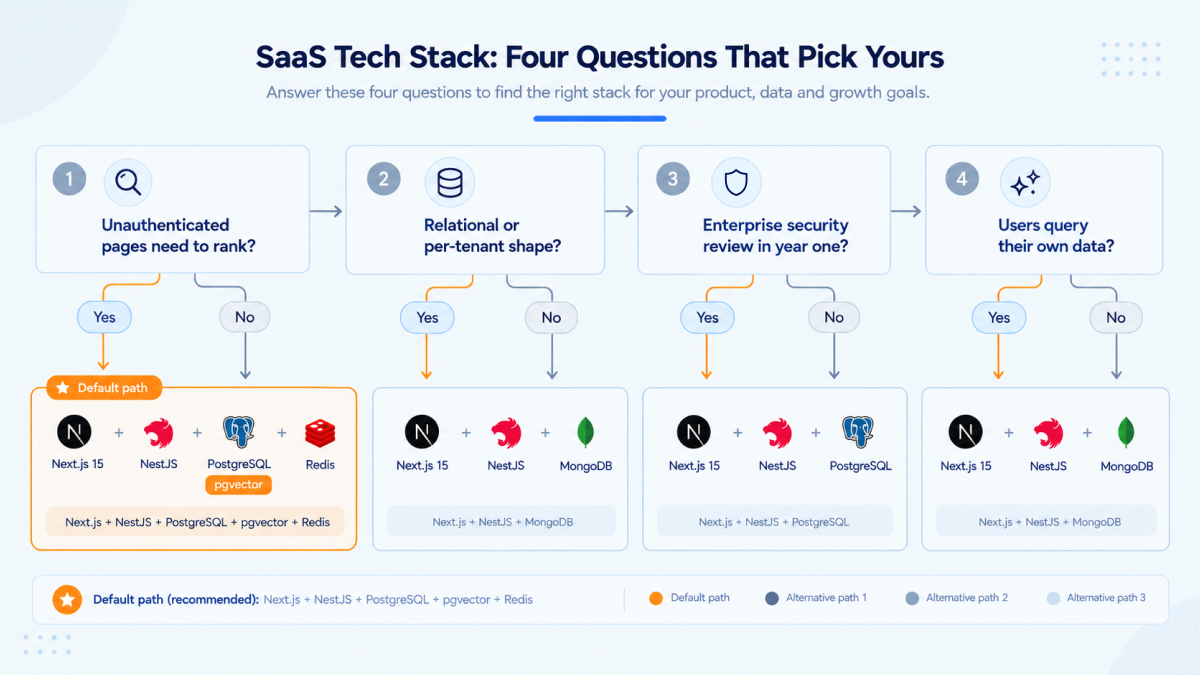
SaaS Tech Stack: Four Questions That Pick Yours
A SaaS tech stack is not chosen off a leaderboard. It is derived from four answers about the product you are actually selling, and each answer narrows the next. Work through them in order before you open a single framework comparison.
Question 1: Do unauthenticated pages need to rank in search?
If your pricing page, docs, changelog, and blog are a real acquisition channel, the frontend has to render on the server. That is Next.js, and it takes a React SPA on Vite off the shortlist. If every route sits behind a login, a plain React SPA is lighter, faster to build, and one less deployment target.
Question 2: Is your core data relational, or does its shape change per customer?
Invoices, seats, teams, permissions, and usage records are relational. They belong in PostgreSQL, and putting them in a document store means writing joins in application code for the life of the product. Tenant-defined fields, event streams, and large nested config blobs belong in MongoDB. Most products have both, which is why the honest answer is usually PostgreSQL first and MongoDB second, not one instead of the other.
Question 3: Will an enterprise security review happen in year one or year three?
If SSO, audit logs, and a signed data processing agreement are on the table inside twelve months, you want a framework that enforces module boundaries and generates its own API documentation. That is NestJS. If the first enterprise conversation is genuinely years out, Express starts faster and is cheap enough to replace later.
Question 4: Will users search or ask questions over their own data?
If yes, embeddings need a home from day one, not after the fact. pgvector inside the PostgreSQL you are already running is the cheapest correct answer for most products, and a dedicated vector database earns its own bill only once your index outgrows what a single Postgres instance serves comfortably.
| Your four answers | The stack that follows | What it costs you |
|---|---|---|
| SEO yes, relational, enterprise soon, AI yes | Next.js + NestJS + PostgreSQL + pgvector + Redis | Slowest to start, cheapest in year two |
| SEO yes, relational, enterprise later, AI no | Next.js + Next.js API routes + PostgreSQL | No second service to run, deploy, or monitor |
| SEO no, flexible data, enterprise later, AI no | React SPA + Express + MongoDB | Fastest to a demo, a rewrite is likely |
| SEO no, relational, enterprise soon, AI yes | React SPA + NestJS + PostgreSQL + pgvector | Enforced structure without the SSR overhead |
The trap is answering question 3 with optimism. Teams that assume enterprise is far away build on Express, then lose a quarter retrofitting SSO, audit trails, and tenant isolation in the week a real contract finally appears. Answering that one honestly is worth more than any framework benchmark you will read this year.
B2B SaaS Tech Stack: What Enterprise Buyers Add to the Bill
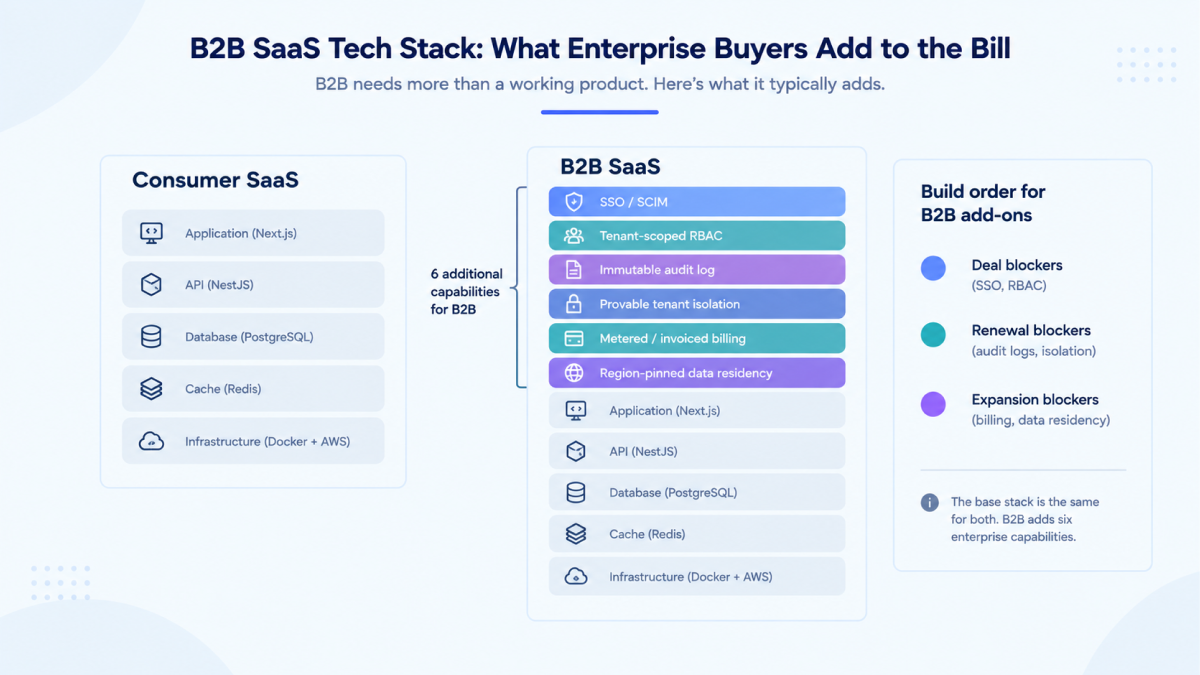
A B2B SaaS tech stack is the consumer stack plus everything a procurement and security review will ask for. The frameworks do not change. What changes is that six capabilities stop being roadmap items and become gating requirements, and every one of them is far cheaper to design in than to bolt on.
| Capability | Consumer SaaS | B2B SaaS | Where it belongs in the stack |
|---|---|---|---|
| Identity | Email and social login | SAML or OIDC single sign-on per tenant, plus SCIM provisioning | A dedicated auth layer such as WorkOS, Auth0, Clerk, or Keycloak, never hand-rolled |
| Authorization | One user role | Tenant-scoped RBAC with customer-defined roles | A single policy module in the backend, evaluated in one place rather than per endpoint |
| Audit | Optional | Immutable, exportable log of every privileged action | Append-only PostgreSQL table, written inside the same transaction as the action itself |
| Tenant isolation | A row filter | A row filter you can prove, sometimes a schema or database per tenant | A tenant identifier on every table from day one, enforced at the ORM or query-builder layer |
| Billing | Card, self-serve | Annual contracts, purchase orders, invoices, seat true-ups, usage metering | Stripe Billing plus your own metering store, because seat counts get disputed and you need the raw events |
| Environments | Production and staging | A buyer-facing sandbox with seeded data | The same infrastructure-as-code, a third stack, effectively non-negotiable for API-first products |
| Data residency | One region | EU or US residency on request | A region-pinned primary database chosen before launch, not migrated after |
Build order matters more than build completeness. SSO and tenant-scoped RBAC block deals, so they come first. Audit logs and data residency block renewals and security questionnaires, so they come second. Usage metering and the sandbox block expansion revenue, so they come third. A team that ships all six at once usually ships none of them well.
Two of these are load-bearing on the database choice you made in question 2 above. An audit log that has to survive a customer's forensic request wants transactional writes and strict ordering, which is PostgreSQL. Per-tenant data residency wants a database you can pin to a region and replicate deliberately, which rules out a single global cluster. This is the concrete reason most B2B SaaS teams end up on PostgreSQL even when their first prototype was MongoDB, and it is the single most common migration we get called in to run.
The 2026 JavaScript Ecosystem: What Changed
If you read SaaS architecture guides from 2020-2022, you'll notice three major shifts:
Shift 1: SSR Is No Longer Optional for Customer-Facing SaaS
Search engines now aggressively prioritize Core Web Vitals. Single-page applications (SPAs) that render empty shells then fetch data suffer in rankings. Your marketing pages, blog, documentation, and even authenticated dashboard entry points now benefit from:
- Server-side rendering (SSR)
- React Server Components (RSC)
- Edge rendering (sub-100ms global response)
- Streaming HTML
- Partial Prerendering (PPR) - Next.js now supports PPR, which combines static generation and dynamic rendering in the same page. This allows SaaS platforms to deliver fast marketing pages while still rendering dynamic user data securely.
- Edge Functions allow SaaS applications to run lightweight logic close to users globally, reducing latency for authentication checks, personalization, and A/B testing.
That's why Next.js has become the de facto React framework for serious SaaS products. You can build on this foundation with our Next.js development experts.
Shift 2: TypeScript Is Non-Negotiable
Every production SaaS codebase in 2026 uses TypeScript. The reasons:
- Whole classes of runtime type error caught at build time instead of in production
- Self-documenting code that speeds up onboarding
- IDE autocomplete that removes guesswork when a developer touches unfamiliar parts of the codebase
- Safer refactoring when business requirements change
Your stack choice must be TypeScript-first, not TypeScript-as-an-afterthought.
Shift 3: AI Infrastructure Is Expected, Not Optional
Customers now expect:
- Semantic search over their data
- AI-assisted workflows
- Natural language querying
- Intelligent recommendations
Your 2026 SaaS architecture must accommodate vector embeddings, RAG pipelines, and LLM integrations without a complete rebuild. Our AI-powered full-stack developers integrate these capabilities using current LLM orchestration tooling, without forcing a rebuild of the rest of the stack.
Two Viable Architectures: MERN vs Modern Stack
Let's be honest about both options. Neither is "wrong" - they serve different stages and requirements.
Option A: The Modern SaaS Stack (2026 Recommended)
Frontend Layer
├── Next.js 15+ (App Router)
│   ├── React Server Components
│   ├── Server Actions
│   ├── Partial Prerendering (PPR)
│   └── Edge Runtime (optional)

Backend Layer
├── NestJS (modular Node.js framework)
│   ├── TypeScript-first
│   ├── Dependency injection
│   ├── Microservice-ready
│   └── OpenAPI generation

Data Layer
├── PostgreSQL (primary relational data)
├── MongoDB (flexible documents, analytics)
├── Redis (caching, sessions, queues)
├── Vector Database (Pinecone / Weaviate / Supabase Vector
├── pgvector / Qdrant)
└── S3-compatible storage (user files)

Infrastructure
├── Docker containers
├── Kubernetes / AWS ECS
├── CI/CD (GitHub Actions)
└── Infrastructure as Code (Terraform)
Best for: B2B SaaS with marketing needs, enterprise requirements, long-term scalability, and AI features. This stack is where our Node.js developers and Next.js specialists excel.
Option B: Lean MERN Stack (Startup MVP)
Frontend
├── React 19 (Vite for build)
├── React Router
└── TanStack Query (data fetching)

Backend
├── Node.js
├── Express.js (or Fastify for better perf)
└── MongoDB Native Driver / Mongoose

Data
├── MongoDB Atlas (primary)
├── Redis (caching)
└── S3 (file storage)

Infrastructure
├── Docker (optional but recommended)
├── Simple CI/CD
└── Single-region deployment
Best for: Internal tools, authenticated-only applications, extremely fast MVPs, teams with limited backend experience. If this sounds like your current stage, consider hiring dedicated MERN Stack developers to accelerate your MVP.
Real Examples of SaaS Tech Stacks
Popular SaaS platforms use similar architectures:
| Platform | Stack Highlights |
|---|---|
| Stripe | Next.js + TypeScript + Ruby services + PostgreSQL |
| Notion | React + Node.js + PostgreSQL |
| Vercel | Next.js + Go services + PostgreSQL |
| Supabase | Next.js + Postgres + Edge Functions |
| Linear | Next.js + GraphQL + PostgreSQL |
These examples show that the modern JavaScript stack (Next.js + Node.js + PostgreSQL) is battle-tested at scale.
Layer-by-Layer Breakdown (With Decision Rules)
Frontend: Next.js vs React SPA
In 2026, start with Next.js unless you have a compelling reason not to.
| Requirement | Choice | Why |
|---|---|---|
| SEO-critical marketing pages | Next.js | SSR, metadata API, sitemap generation, PPR |
| Authenticated dashboard only | Either | Both work, but Next.js adds future flexibility |
| Mobile app with web admin | React SPA | Simpler API-only architecture |
| Content-heavy SaaS | Next.js | Built-in image optimization, ISR |
TypeScript implementation:
// app/dashboard/page.tsx - Next.js Server Component
import { getServerSession } from "next-auth";
import { redirect } from "next/navigation";
import { DashboardStats } from "@/components/dashboard-stats";
import { prisma } from "@/lib/prisma";

export default async function DashboardPage() {
  const session = await getServerSession();

  if (!session) {
    redirect("/login");
  }

  // This fetches on the server - no client loading states needed
  const stats = await prisma.user.findUnique({
    where: { email: session.user.email },
    include: { subscriptions: true }
  });

  return <DashboardStats initialData={stats} />;
}
Backend: NestJS vs Express
Express can power production SaaS systems, but it requires strong architecture discipline because it provides minimal structure. NestJS provides enterprise-grade architecture out of the box, which is why many SaaS teams prefer it for long-term projects.
| Factor | Express | NestJS |
|---|---|---|
| Code organization | Manual (your discipline) | Enforced modules |
| Type safety | Optional | Mandatory |
| Testing | DIY | Built-in test harness |
| Microservices | Manual | First-class support |
| Documentation | Manual | OpenAPI auto-generation |
| Learning curve | Low | Moderate |
Verdict: Use Express for prototypes you might throw away. Use NestJS for code you'll maintain for years. Our Node.js developers are proficient in both and can guide you to the right choice.
Many teams also use modern ORMs. Many SaaS teams use Prisma or Drizzle ORM with PostgreSQL for type-safe database queries.
NestJS module example:
// billing.module.ts
@Module({
  imports: [
    MongooseModule.forFeature([{ name: Subscription.name, schema: SubscriptionSchema }]),
    HttpModule.registerAsync({
      useFactory: () => ({
        baseURL: 'https://api.stripe.com/v1',
        headers: { Authorization: `Bearer ${process.env.STRIPE_SECRET_KEY}` }
      })
    })
  ],
  controllers: [BillingController],
  providers: [
    BillingService,
    StripeWebhookHandler,
    SubscriptionValidator
  ],
  exports: [BillingService]
})
export class BillingModule {}
Database: MongoDB vs PostgreSQL
This is the most contentious decision. Here's the objective truth:
Choose PostgreSQL when:
- Your data is highly relational (invoices, line items, users, teams)
- You need strict ACID compliance
- You'll run complex analytical queries
- You want to use a single database for everything
- You plan to use pgvector for AI embeddings (excellent PostgreSQL extension)
Choose MongoDB when:
- Your data shapes vary significantly between tenants
- You're iterating rapidly with evolving schemas
- You're storing large nested documents (JSON blobs)
- You need horizontal scaling from day one
The pragmatic 2026 approach: Use both.
Modern SaaS applications frequently use:
- PostgreSQL for users, subscriptions, teams, permissions
- MongoDB for tenant-specific data, analytics events, flexible configurations
- Redis for real-time counters, sessions, rate limiting
- pgvector (PostgreSQL) for embeddings and similarity search
Connection example (TypeScript):
// database.config.ts
export const databaseConfig = {
  postgres: {
    url: process.env.DATABASE_URL,
    ssl: process.env.NODE_ENV === 'production'
  },
  mongodb: {
    uri: process.env.MONGODB_URI,
    dbName: 'saas-tenant-data',
    maxPoolSize: 50
  },
  redis: {
    url: process.env.REDIS_URL,
    maxRetriesPerRequest: 3
  }
};
Core SaaS Features Every Application Needs
1. Authentication with Enterprise Readiness
In 2026, basic email/password isn't enough.
Your auth system must support:
- Social login (Google, Microsoft, GitHub) - removes the password step, usually the largest single drop-off in a signup flow
- SAML/SSO for enterprise customers (non-negotiable for B2B)
- Role-based access control (owner, admin, member, viewer)
- API key authentication for programmatic access
- MFA for security-conscious customers
Implementation approach:
// Using NextAuth.js with multiple providers
import NextAuth from "next-auth";
import GoogleProvider from "next-auth/providers/google";
import EmailProvider from "next-auth/providers/email";
import { MongoDBAdapter } from "@next-auth/mongodb-adapter";

export const authOptions = {
  adapter: MongoDBAdapter(client),
  providers: [
    GoogleProvider({ clientId, clientSecret }),
    EmailProvider({ server, from }),
    // Add SAML provider for enterprise
  ],
  callbacks: {
    async session({ session, user }) {
      // Add tenant context to session
      session.user.tenantId = user.tenantId;
      session.user.role = user.role;
      return session;
    }
  }
};
2. Multi-Tenancy: Get This Right on Day One
Multi-tenancy means serving multiple customers from one codebase with complete data isolation. Ignoring this until later is the most expensive mistake in SaaS development.
Three implementation levels:
| Level | Approach | Best For | Data Leak Risk |
|---|---|---|---|
| 1 | Shared database, tenant ID on every record | Early-stage MVPs | Low (if queries filter correctly) |
| 2 | Separate collections/table per tenant | Growing SaaS with compliance needs | Very low |
| 3 | Separate database per tenant | Enterprise, healthcare, finance | None |
Level 1 implementation (start here):
// models/subscription.model.ts (Mongoose)
const subscriptionSchema = new Schema({
  tenantId: { type: String, required: true, index: true },
  planId: String,
  status: String,
  currentPeriodStart: Date,
  currentPeriodEnd: Date
});

// Always filter by tenantId
subscriptionSchema.pre('find', function() {
  if (!this.getQuery().tenantId) {
    throw new Error('Query must include tenantId');
  }
});
3. Subscription Billing That Won't Leak Revenue
Stripe remains the industry standard - but integration complexity is often underestimated.
Must-handle webhooks:
customer.subscription.createdcustomer.subscription.updatedcustomer.subscription.deletedinvoice.payment_succeededinvoice.payment_failed
Critical business logic:
// webhooks/stripe.webhook.ts
@WebhookHandler('invoice.payment_failed')
async handleFailedPayment(event: Stripe.Event) {
  const { customer, subscription } = event.data.object;

  // 1. Update subscription status in database
  await this.subscriptionsService.markPastDue(subscription);

  // 2. Send email to customer
  await this.emailService.sendPaymentFailed(customer);

  // 3. Enqueue retry logic
  await this.queueService.add('payment-retry', {
    customer,
    subscription,
    attempts: 1
  });

  // 4. Notify internal team for high-value customers
  if (subscription.amount > 1000) {
    await this.slackService.notifySalesTeam(customer);
  }
}
4. Background Jobs: Your Performance Safety Net
Any operation taking >500ms should be a background job:
- PDF generation
- Email sending
- Data exports
- Image processing
- Third-party syncs
- Report generation
BullMQ with Redis (standard in 2026):
// jobs/export.queue.ts
import { Queue, Worker } from 'bullmq';

export const exportQueue = new Queue('data-export', {
  connection: redisConnection,
  defaultJobOptions: {
    attempts: 3,
    backoff: { type: 'exponential', delay: 1000 }
  }
});

// Worker processes jobs
new Worker('data-export', async (job) => {
  const { tenantId, format, userId } = job.data;

  // 1. Fetch data
  const data = await exportService.collectData(tenantId);

  // 2. Generate file
  const file = await exportService.generate(data, format);

  // 3. Upload to S3
  const url = await storageService.upload(file, `exports/${userId}`);

  // 4. Notify user
  await notificationService.sendExportReady(userId, url);
}, { connection: redisConnection });
5. Analytics That Drive Product Decisions
Modern analytics stack:
- PostHog (open-source, self-hostable alternative to Mixpanel)
- OpenTelemetry for infrastructure monitoring
- Custom dashboards with Recharts/Victory
Event tracking implementation:
// lib/analytics.ts
export const analytics = {
  track: async (userId: string, event: string, properties: Record<string, any>) => {
    // 1. Send to PostHog
    await posthog.capture({ distinctId: userId, event, properties });

    // 2. Store raw events in MongoDB for custom queries
    await db.collection('events').insertOne({
      userId,
      event,
      properties,
      timestamp: new Date()
    });

    // 3. Update materialized views for dashboards
    await incrementDashboardCounts(event, properties.tenantId);
  }
};
Scaling Strategy: From 0 to 1 Million Users
Phase 1: 0-1,000 Users (First 3 Months)
Architecture:
- Single Next.js application
- Single Node.js API server
- MongoDB Atlas (M10 cluster)
- Redis Cloud (free tier)
- Deployed on a single VM or Vercel
Focus: Product-market fit, not scalability.
Phase 2: 1,000-50,000 Users (Months 3-12)
Architecture upgrades:
- Database indexing - Identify slow queries and add compound indexes
- Redis caching - Cache dashboard queries, session data
- CDN - CloudFront/Cloudflare for static assets
- Read replicas - Separate read traffic from writes
Critical indexing example:
// Create compound indexes for common query patterns
db.subscriptions.createIndex({ tenantId: 1, status: 1, createdAt: -1 });
db.users.createIndex({ tenantId: 1, email: 1 }, { unique: true });
db.events.createIndex({ userId: 1, timestamp: -1 });
Planning a SaaS platform and unsure about the right architecture? Our engineers help founders design scalable SaaS systems before development begins. Book a free architecture consultation.
Phase 3: 50,000-500,000 Users (Year 2)
Architecture upgrades:
- Horizontal scaling - Multiple Node.js instances behind load balancer
- Background job workers - Dedicated worker processes
- Microservices boundaries - Split billing, notifications, analytics
- Database sharding - If using MongoDB, enable sharding
Node.js clustering:
// cluster.ts
import cluster from 'cluster';
import os from 'os';

if (cluster.isPrimary) {
  const numCPUs = os.cpus().length;

  for (let i = 0; i < numCPUs; i++) {
    cluster.fork();
  }

  cluster.on('exit', (worker) => {
    console.log(`Worker ${worker.process.pid} died. Restarting...`);
    cluster.fork();
  });
} else {
  bootstrap(); // Your application entry point
}
Phase 4: 500,000+ Users (Year 3+)
Architecture upgrades:
- Kubernetes for container orchestration
- Service mesh (Istio/Linkerd) for observability
- Event-driven architecture with Kafka
- Multi-region deployment for global users
Security Requirements for Production SaaS
OWASP Top 10 Implementation Checklist
| Control | Implementation |
|---|---|
| Input validation | Zod / Yup schemas on all endpoints |
| Authentication | NextAuth.js, proper session management |
| Rate limiting | express-rate-limit, Redis-based throttling |
| Security headers | Helmet.js middleware |
| SQL injection | Prisma/Mongoose parameterized queries |
| XSS protection | React's built-in escaping, CSP headers |
| CSRF | CSRF tokens for state-changing operations |
| Secrets management | AWS Secrets Manager / HashiCorp Vault |
| Dependency scanning | npm audit, Snyk, Dependabot |
| Audit logging | Centralized logs with user context |
GDPR Compliance (Applies Even Outside EU)
Required features:
// GDPR compliance endpoints
@Controller('gdpr')
export class GDPRController {
  @Get('export/:userId')
  async exportUserData(@Param('userId') userId: string) {
    // Collect all user data across databases
    const userData = await Promise.all([
      this.userService.findById(userId),
      this.subscriptionService.findByUser(userId),
      this.eventService.findByUser(userId),
      this.supportTicketService.findByUser(userId)
    ]);

    // Generate JSON export
    const exportFile = await this.exportService.generate(userData);

    // Store for 30 days (GDPR requirement)
    await this.storageService.save(`exports/${userId}`, exportFile, { ttl: 30 });

    // Email download link
    await this.emailService.sendDataExport(userId, exportFile.url);
  }

  @Delete('delete/:userId')
  async deleteUserData(@Param('userId') userId: string) {
    // Anonymize or delete across all services
    await this.userService.anonymize(userId);
    await this.subscriptionService.cancelAndAnonymize(userId);
    await this.eventService.deleteByUser(userId);

    // Log deletion for audit trail
    await this.auditService.log('GDPR_DELETION', { userId });
  }
}
Deployment Architecture That Actually Works
The Stack We Use in Production
| Component | Choice | Why |
|---|---|---|
| Containerization | Docker | Consistency across environments |
| Orchestration | AWS ECS (start) → Kubernetes (scale) | Managed vs control tradeoff |
| CI/CD | GitHub Actions | Integrated with code |
| Database | MongoDB Atlas | Managed, automated backups |
| Cache | AWS ElastiCache Redis | Managed, high availability |
| Storage | AWS S3 + CloudFront | Reliable, global, cost-effective |
| Monitoring | Datadog / New Relic | APM, traces, metrics |
| Logging | AWS CloudWatch + ELK | Searchable, retainable |
| DNS | AWS Route 53 | Health checks, failover |
GitHub Actions CI/CD Pipeline
name: Deploy SaaS Application

on:
  push:
    branches: [main]

jobs:
  test:
    runs-on: ubuntu-latest
    steps:
      - uses: actions/checkout@v4
      - uses: actions/setup-node@v4
        with:
          node-version: '22' # Using Node 22 LTS
      - run: npm ci
      - run: npm run test
      - run: npm run test:e2e

  build-and-deploy:
    needs: test
    runs-on: ubuntu-latest
    steps:
      - name: Configure AWS credentials
        uses: aws-actions/configure-aws-credentials@v4

      - name: Login to Amazon ECR
        id: login-ecr
        uses: aws-actions/amazon-ecr-login@v2

      - name: Build and tag Docker image
        env:
          ECR_REGISTRY: ${{ steps.login-ecr.outputs.registry }}
          ECR_REPOSITORY: saas-app
          IMAGE_TAG: ${{ github.sha }}
        run: |
          docker build -t $ECR_REGISTRY/$ECR_REPOSITORY:$IMAGE_TAG .
          docker push $ECR_REGISTRY/$ECR_REPOSITORY:$IMAGE_TAG

      - name: Deploy to ECS
        run: |
          aws ecs update-service --cluster saas-cluster \
            --service saas-service \
            --force-new-deployment
AI-Ready SaaS Architecture (2026 Imperative)
The Minimum AI Feature Set
By 2026, customers expect:
- Semantic search over their data
- AI-assisted workflows (auto-fill, suggestions)
- Natural language dashboards ("Show me revenue last quarter")
- Intelligent recommendations based on usage patterns
Architecture Components
// ai/embeddings.service.ts
export class EmbeddingsService {
  async generateEmbeddings(text: string): Promise<number[]> {
    const response = await fetch('https://api.openai.com/v1/embeddings', {
      method: 'POST',
      headers: {
        'Authorization': `Bearer ${process.env.OPENAI_API_KEY}`,
        'Content-Type': 'application/json'
      },
      body: JSON.stringify({
        model: 'text-embedding-3-small',
        input: text
      })
    });

    const data = await response.json();
    return data.data[0].embedding;
  }

  async storeWithEmbeddings(tenantId: string, document: any) {
    // Generate embedding for searchable content
    const embedding = await this.generateEmbeddings(
      `${document.title} ${document.description} ${document.content}`
    );

    // Store in vector database (Pinecone example)
    await pinecone.index('saas-content').upsert([{
      id: document.id,
      values: embedding,
      metadata: {
        tenantId,
        title: document.title,
        type: document.type
      }
    }]);

    // Also store in primary database
    await db.collection('documents').insertOne(document);
  }

  async semanticSearch(tenantId: string, query: string) {
    const queryEmbedding = await this.generateEmbeddings(query);

    // Search vector database
    const results = await pinecone.index('saas-content').query({
      vector: queryEmbedding,
      filter: { tenantId },
      topK: 10,
      includeMetadata: true
    });

    return results.matches;
  }
}
RAG Pipeline for Customer Support
// ai/rag.service.ts
export class RAGService {
  async answerQuestion(tenantId: string, question: string) {
    // 1. Retrieve relevant context
    const relevantDocs = await this.semanticSearch(tenantId, question);

    // 2. Build prompt with context
    const prompt = `
      Context from customer's data:
      ${relevantDocs.map(d => d.metadata.content).join('\n')}

      Question: ${question}

      Answer based only on the provided context:
    `;

    // 3. Generate answer with LLM (using latest 2026 models)
    const response = await openai.chat.completions.create({
      model: 'gpt-4o', // or gpt-4.1-mini, gpt-4o-mini
      messages: [{ role: 'user', content: prompt }],
      temperature: 0.1
    });

    // 4. Return answer with sources
    return {
      answer: response.choices[0].message.content,
      sources: relevantDocs.map(d => d.metadata.source)
    };
  }
}
Integrating these AI capabilities requires specialised expertise. Our AI-powered full-stack developers work daily with AI orchestration tooling such as Cursor and Claude CLI, and they ship embedding pipelines and retrieval layers into production systems rather than demos.
SaaS Architecture Reference Stack (2026)
Here's a clean reference stack you can use as a starting point for your next SaaS project:
| Layer | Technology |
|---|---|
| Frontend | Next.js 15 + TypeScript |
| Backend | NestJS (or Express for simpler projects) |
| Primary Database | PostgreSQL with pgvector for embeddings |
| Document Store | MongoDB (optional, for flexible data) |
| Caching & Queues | Redis + BullMQ |
| Authentication | NextAuth.js / Auth0 |
| File Storage | AWS S3 + CloudFront |
| Infrastructure | Docker + AWS ECS (or Kubernetes at scale) |
| Monitoring | Datadog / New Relic |
| CI/CD | GitHub Actions |
This combination balances developer experience, scalability, SEO performance, and AI readiness. If you need help implementing this stack, our team of Next.js and Node.js experts is ready to assist. For a dedicated developer who builds and runs the whole SaaS product on this stack, see our SaaS development services.
Cost Analysis: What You'll Actually Spend
Development Costs
| Scope | Timeline | Estimated Cost |
|---|---|---|
| MVP (auth, billing, core feature) | 8-12 weeks | $25,000-$50,000 |
| Full-featured SaaS | 4-6 months | $75,000-$150,000 |
| Enterprise SaaS (compliance, SSO, audit) | 6-9 months | $150,000-$300,000+ |
Monthly Infrastructure Costs (Estimated)
| Users | Monthly Cost | Typical Configuration |
|---|---|---|
| 0-1,000 | $50-$150 | 1 VM + MongoDB M10 |
| 1,000-10,000 | $300-$800 | 2-3 VMs + MongoDB M30 |
| 10,000-50,000 | $1,000-$3,000 | 5-10 VMs + MongoDB clusters |
| 50,000-200,000 | $3,000-$10,000 | Kubernetes + managed services |
Cost optimization tips:
- Use reserved instances for baseline capacity
- Implement auto-scaling for variable load
- Cache aggressively to reduce database calls
- Use spot instances for batch processing
When to Choose Each Stack (Decision Matrix)
| Scenario | Recommended Stack |
|---|---|
| You need an MVP in <8 weeks, SEO not critical | MERN (React + Express + MongoDB) - Hire MERN developers |
| You're building a B2B SaaS with marketing pages | Next.js + NestJS + PostgreSQL - Hire Next.js developers |
| You need AI features (semantic search, RAG) | Add pgvector / Pinecone - Hire AI-powered developers |
| You have a large team requiring code structure | NestJS - Hire Node.js developers |
| You need to validate the product direction before committing to structure | Start with MERN, plan to evolve |
| You need enterprise compliance (SOC2, GDPR) | Modern stack with NestJS + PostgreSQL |
Frequently Asked Questions
Should SaaS startups use MongoDB or PostgreSQL in 2026?
It depends on your data. If your data is highly relational (users, subscriptions, invoices, teams), start with PostgreSQL. If your data is varied per tenant and evolves rapidly, start with MongoDB. Many successful SaaS companies use both: PostgreSQL for core business entities, MongoDB for tenant-specific flexible data. With pgvector, PostgreSQL is now a strong choice for AI features too.
Is serverless good for SaaS?
Yes, for the right use cases. Serverless (AWS Lambda, Vercel) excels for:
- Low-to-medium traffic
- Variable workloads
- Reducing operational overhead
- Rapid iteration
Avoid serverless for:
- Consistent high traffic (costs become higher)
- WebSocket-heavy applications
- Very low latency requirements (<50ms)
Many SaaS companies use a hybrid: serverless for APIs, containers for background jobs.
How much traffic can Node.js handle?
More than most teams assume, and the honest answer is that throughput depends on your workload, your database latency, and your hardware rather than on Node.js itself. Light JSON endpoints sustain far higher volume than endpoints doing heavy synchronous work, and clustering across CPU cores multiplies whatever a single process manages. Benchmark your own endpoints rather than trusting a published number: most SaaS applications hit database limits long before they hit Node.js limits.
When should you move from monolith to microservices?
Answer: Later than you think.
Only consider microservices when:
- Your team has grown beyond 15-20 engineers
- Different parts of the system have different scaling needs
- You need independent deployability for different modules
- You're experiencing "merge hell" with a monolith
For the first 2-3 years, a well-structured modular monolith is superior.
How many engineers to build a SaaS product?
- MVP: 1-3 engineers (full-stack)
- Growth stage: 4-8 engineers (frontend, backend, DevOps split)
- Scale stage: 10+ engineers with specialized roles
What about the MEAN stack (Angular instead of React)?
Angular remains viable for large teams that benefit from strict structure. However, React/Next.js has a significantly larger ecosystem and talent pool in 2026. Choose Angular if your team has existing expertise; otherwise, React is the safer bet.
Do I need a separate backend if using Next.js?
Not necessarily. Next.js API routes and Server Actions can handle backend logic for many applications. You need a separate backend (NestJS/Express) when:
- You have heavy background processing
- You need WebSocket servers
- You're building mobile apps alongside web
- You want to expose a public API
Real-World Context: What We've Built
Our team at Empiric Infotech has shipped SaaS products across FinTech, EdTech, HR Tech, HealthTech, and E-Commerce, for clients in the USA, Europe, and Australia. We have made most of the mistakes listed in this guide, which is why they are listed.
A representative engagement: a FinTech client came to us with a prototype built on Express and MongoDB. They were several months in, had a closed beta running, and were hitting performance walls. We helped them:
- Refactor to NestJS for better code organization
- Add PostgreSQL for financial transactions (keeping MongoDB for user preferences)
- Implement proper caching with Redis
- Set up background job processing for reports
The result was a platform that absorbed their growth without a second rewrite, and an architecture their enterprise customers could actually review, because the structure was in place before the questionnaire arrived.
Getting Started With Your SaaS Build
Week 1-2: Foundation
- Set up Next.js with TypeScript
- Configure authentication (NextAuth.js)
- Design database schema
- Set up CI/CD pipeline
Week 3-4: Core Features
- Implement multi-tenancy
- Build user management
- Create tenant onboarding flow
- Set up logging and monitoring
Week 5-6: Billing
- Integrate Stripe
- Implement subscription webhooks
- Build customer portal
- Test payment flows
Week 7-8: MVP Completion
- Build core feature set
- Implement background jobs
- Add analytics tracking
- Deploy to production
Week 9-12: Polish & Launch
- Performance optimization
- Security audit
- Documentation
- Beta testing
- Public launch
Where Most Startups Go Wrong (And How to Avoid It)
Mistake 1: Building for Scale Before Product-Market Fit
Reality: most startups never reach the traffic that would justify the architecture they built for it. Premature optimization spends time you needed for finding customers.
Fix: Build for 1,000 users. If you succeed, you can scale. If you don't, nothing else matters.
Mistake 2: Ignoring Multi-Tenancy
Reality: Adding tenant isolation after launch requires rewriting every query and endpoint.
Fix: Add tenantId filters from day one, even if you only have one tenant.
Mistake 3: DIY Authentication
Reality: Authentication is harder than it looks. Security holes here kill companies.
Fix: Use NextAuth.js, Auth0, or Clerk. Never roll your own auth.
Mistake 4: Synchronous Everything
Reality: Slow operations block the event loop, causing timeouts and poor UX.
Fix: Queue everything that isn't instantaneous.
Mistake 5: No Monitoring
Reality: You won't know something broke until customers angrily email you.
Fix: Set up Datadog/New Relic before launch. Configure alerts for errors and slow responses.
How Empiric Infotech Helps You Build a SaaS Product
We've been building SaaS products for a long time - not as a side offering, not as one of twenty service lines. It is genuinely what we do best, and we've honed our process to be transparent and effective.
Our Process
Discovery (Weeks 1-2)
We map your requirements, define the data model, design the multi-tenant architecture, and agree on scope and timeline before writing a single line of code.
Architecture and Setup (Weeks 2-3)
We establish a TypeScript monorepo, set up the CI/CD pipeline and Docker configuration, design the database schema, and structure the modules, whether in NestJS or Express.js.
Core Development (Weeks 3-12)
We build authentication, billing, multi-tenancy, core business logic, and frontend dashboards. With bi-weekly demos, you see working software every two weeks, not a black box that opens at the end.
Launch Preparation (Weeks 12-14)
We conduct load testing, a full security review, monitoring configuration, staging environment validation, and create a detailed deployment runbook.
Post-Launch Support
We do not disappear at launch. Some of our longest relationships started as MVP engagements and grew into multi-year product partnerships.
Ready to Build Your SaaS Product?
No sales pitch. No pressure. Just a real conversation about what you're trying to build and whether we're the right team to help you build it.
Whether you need MERN Stack developers, Next.js specialists, Node.js experts, or AI-powered full-stack engineers, we have the talent to bring your vision to life.
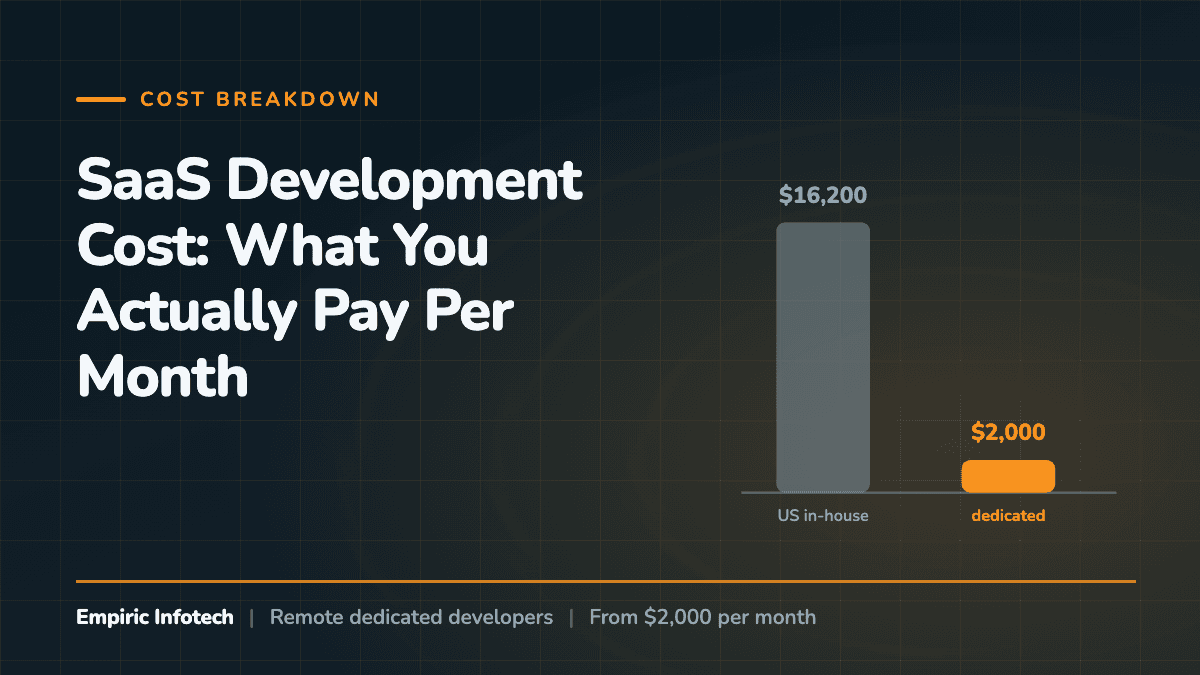
Most SaaS teams do not need a separate hire for every layer in the reference table above. They need two or three engineers who already know this stack and who stay on the product long enough to own the decisions they made. That is the shape of our work: you can hire remote dedicated developers from $2,000/month, billed monthly upfront for 160 to 172 hours per developer, starting with a 7-day risk-free trial before the first invoice.